

A budget can be fully allocated and still leave a marketing team overloaded. Effective marketing resource allocation tools bring campaign spending, team capacity, workloads and performance into view, helping managers see where resources are stretched and where they can be used more effectively.
It’s easy to focus on the budget alone. But a plan also depends on who has the time and skills to do the work, how priorities shift and what results each campaign delivers. When those details sit in separate systems, bottlenecks are harder to spot and timely adjustments become more difficult.
This guide explains how resource allocation software supports budget planning, capacity management and workload balancing, and what to consider when adopting it. It also explores how performance data and AI-powered forecasting can inform decisions, bringing disconnected information into a clearer view of what to fund, who can take on the work and where plans may need to change.
Key Takeaways
- Choose software that connects campaign budgets, team capacity, workflows and marketing assets, so planning gaps are easier to spot.
- Balance funding with the people and skills available to deliver each campaign, then adjust plans as priorities shift.
- Make workloads visible to identify bottlenecks, set realistic deadlines and assign work according to team members’ strengths.
- Support adoption by documenting workflows, involving key stakeholders and giving teams practical training.
- Use performance insights and predictive modelling to inform resource decisions, while treating forecasts as inputs rather than guarantees.
Marketing resource management software capabilities
Marketing resource management (MRM) software coordinates people, budgets, projects, workflows and digital assets through shared processes and tracking. For 2026, the best marketing resource allocation tools are those that match a team’s planning needs and connect resource decisions with campaign performance.
Core Features and Ease of Use
Core features can bring project planning, budget tracking, resource calendars, approvals and reporting into one workflow. To assess usability, check whether marketers can quickly find current assignments, update project status and understand approvals. Compare tools by testing a real campaign workflow, from request and resourcing through review and reporting, rather than relying on feature lists alone.
Marketing resource management (MRM) differs from project management software by connecting delivery plans with marketing budgets, people and assets. Project management tools may organise tasks and deadlines, while MRM adds marketing-specific processes such as campaign approvals and asset reuse. Marketing automation handles campaign execution, such as scheduled communications, but does not replace capacity planning or budget allocation. While specialised platforms like frik.io streamline multi-network social media creation and publishing, MRM tools ensure those activities remain balanced against broader team capacity and spend.
Platform Integrations
Platform integrations connect MRM with customer relationship management (CRM), project management and analytics systems. They matter because campaign plans are more useful when project status, customer activity and performance data can inform the same resource decisions. For example, a CRM may show campaign-related customer activity, analytics platforms report channel results, and project tools track delivery.
Integration quality depends on which data moves between systems, how often it updates and whether teams can act on it. Compare tools by following one campaign record from the CRM into project planning, then checking whether results return from analytics. Clear connections reduce duplicate entry and help keep budget, workload and performance views aligned.
Asset and content management is another MRM capability. A shared digital library can organise photos, video, graphics and testimonials, while access controls help teams find approved materials. Usage information across departments or locations can make asset reuse easier to manage. Digital asset management (DAM) focuses chiefly on storing, organising and distributing files; MRM connects those assets to campaign workflows, approvals and resource plans.
MRM’s scope has expanded beyond asset storage. Gartner updated its definition of marketing resource management 2.0 in 2017 to include tools and software spanning asset, work and performance management. That wider scope can include project requests, proofing, recurring reviews, budget tracking and planning staff, freelancers and vendors. Gantt charts can help teams map responsibilities and deadlines across projects.
The market outlook reflects this broader role: the global MRM market was valued at $3.7 billion in 2022 and is expected to reach $6.9 billion by 2028. These figures describe the market, not a guarantee that every platform suits every team. Match capabilities to actual processes, including approvals, budget reporting and campaign performance tracking, before selecting a system.
Marketing budget allocation and capacity planning
Budget planning and forecasting tools bring campaign spending, resource forecasts and reporting together. Look for software that links proposed budgets with available team capacity, so stakeholders can assess plans as a whole.
Budget Planning and Allocation
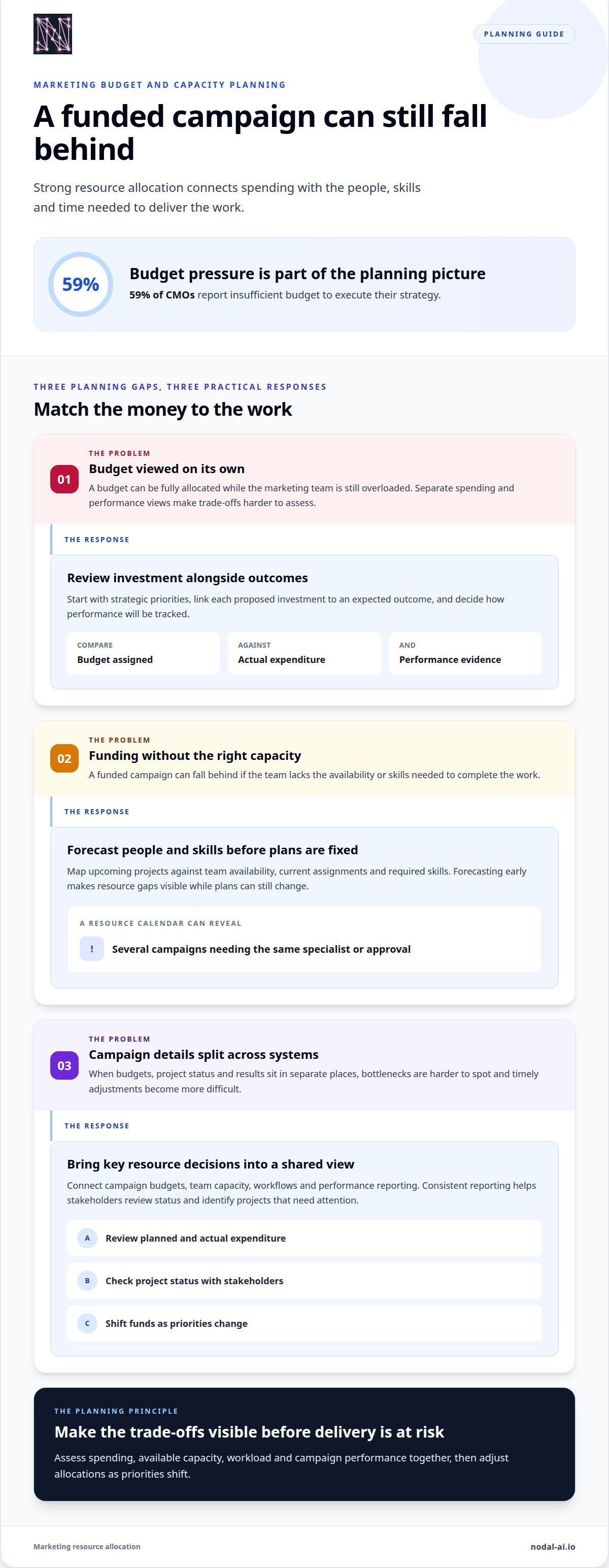
Budget allocation distributes available funds across marketing priorities, campaigns and channels. A comprehensive plan connects spending decisions with the work teams can deliver. Start with strategic priorities, then link each proposed investment to an expected outcome and a way to track performance. This gives stakeholders a shared basis for reviewing trade-offs instead of treating every request as equally urgent.
Budget pressure makes that discipline important: 59% of CMOs report insufficient budget to execute their strategy. A marketing team can use allocation reviews to compare planned spending with campaign results, then shift funds as priorities change. Reporting should show the budget assigned, actual campaign expenditure and performance evidence together. That view helps leaders discuss adjustments using the same information, rather than relying on separate spreadsheets or partial updates.
Campaign Budgeting and Resource Planning
Campaign budgeting assigns funds and people to defined work, deadlines and deliverables. A funded campaign can still fall behind if the team lacks the right capacity. For example, a launch plan should connect channel budgets with the skills, availability and tasks needed to execute each activity. Forecasting these requirements early makes resource gaps visible while plans can still change.
Enterprise marketing planning brings campaign proposals, budgets and reporting into a coordinated view. Management software can support project and campaign budget tracking with campaign details and accounting information. Teams can compare planned and actual expenditure, review status with stakeholders and identify projects that need attention. Consistent reporting also gives decision-makers a clearer basis for revising allocations across campaigns.
For resource forecasting, map upcoming projects against team availability, current assignments and required skills. A resource calendar can reveal when several campaigns need the same specialist or approval. The Marketing Team Resource Allocation template is intended for marketing managers, project managers, team leads and teams managing multiple campaigns or projects. Its Team Directory, Project Overview, Task List, Resource Calendar and Status Reports help organise planning information in one structure.
Connect each campaign’s budget to its planned tasks, owners and deadlines. Then review spending and capacity as campaign information changes, rather than treating the initial plan as fixed. This makes marketing budget planning more comprehensive, because financial decisions reflect both the funds available and the people able to deliver the work.
Marketing resource allocation and workload balancing
Resource utilisation shows how team members’ time and skills are assigned across active work. To assess it, compare each person’s assignments with their availability, role and project deadlines. For example, if one designer owns several campaign launches in the same week, the schedule may reveal a bottleneck before deadlines slip. This view helps managers distinguish genuine capacity from a calendar that looks open but omits work already underway.
Informal coordination can become harder as marketing teams grow beyond 10-15 people. At that size, a shared project view helps replace scattered messages with visible ownership, workload and deadlines. Resource management software can show overlapping assignments, while project management processes clarify who handles each task. If two campaigns need the same analyst, a manager can shift a deadline, reassign work or adjust the project scope.
Balance workloads by comparing effort and deadlines, not simply counting tasks. A content editor with three complex campaign briefs may have a heavier load than a colleague with several short reviews. Add each task’s owner, required skill, due date and status to a resource calendar. Review the schedule during project planning so team members can flag conflicts and managers can adjust assignments before delivery pressure builds.
Skills assignment also affects productivity. Match tasks to people with the relevant expertise and available capacity, then check whether an assignment creates a dependency. For example, a campaign launch may require a copywriter, analyst and designer in sequence. If the analyst’s review is delayed, the next tasks may stall. A visible workflow shows hand-offs and helps managers streamline task order.
Some analyses suggest employees spend less than 40% of their time on the core responsibilities they were hired for. Treat that figure as a prompt to examine interruptions, repeated administration and unclear ownership, not as a target for every team. A practical review can identify recurring blockers, then assign an owner to resolve each one. Resource management software can help track changes over time and show whether workload adjustments free capacity for priority work.
The Marketing Team Resource Allocation template lets teams enter members’ skills, availability and current assignments, then add projects and tasks with deadlines and required resources.
Implementation challenges and user adoption
Start implementation by identifying the marketing department’s pain points and information needs. Teams may, for example, struggle to see campaign ownership, approval status or current asset versions. Define which activities the system should improve before comparing options. This keeps the project focused on useful work rather than features that do not address daily problems, and gives stakeholders a shared basis for judging progress.
Document current workflows before selecting management software. Map a campaign from initial request through planning, review and reporting, then record where delays or duplicate work occur. Describe the desired workflow alongside the current process. This comparison helps an enterprise team identify which processes should change and which should remain familiar. It also clarifies what the system must do to support real marketing activities.
Build an implementation team with stakeholders who understand different parts of the work. Include marketing leads, project managers and IT support, since MRM systems often need IT assistance. The group should define core processes, ownership and decision-making. For example, agree who approves campaign briefs and who maintains shared assets. Clear roles reduce confusion as teams move from informal habits to consistent system workflows.
Training is an adoption requirement, not an optional final task. Allocate internal resources or arrange vendor training so team members can use the system confidently. Focus sessions on practical tasks, such as submitting a project request, updating a deadline or locating an approved asset. This helps marketing teams connect each feature to daily work and supports adoption across different roles.
Roll out the system around a defined workflow instead of migrating every activity at once. A pilot campaign can reveal unclear fields, missing approval steps or reporting gaps before wider adoption. Gather feedback from the people using the process, then refine instructions and permissions. This helps optimise the system around actual work and gives stakeholders a concrete example to explain the change to other teams.
Review the MRM system regularly against agreed goals. Decide how often reviews occur, who conducts them and which goals guide them. A review might examine whether campaign status is current, teams can find assets and reporting supports decisions. Track issues and assign owners for follow-up. Regular reviews keep processes useful as priorities, team structures and marketing activities change.
AI-powered resource allocation and forecasting
AI-powered forecasting uses historical campaign results and current planning data to estimate future resource needs. In marketing resource management, it can help an organisation spot pressure before execution begins. For example, software might compare upcoming launch dates with available specialist capacity and previous delivery patterns. A forecast provides an additional planning view, not a substitute for operational knowledge.
Useful forecasts start with relevant inputs. Campaign timelines, assigned tasks, team availability, channel performance and planned spend can help reveal likely conflicts. If two campaigns depend on the same analyst at the same time, a model could flag the overlap. Managers can then assess whether to adjust timing, reassign work or revise campaign scope before the conflict affects delivery.
AI can also help explore alternative scenarios. A marketing team might compare a plan that funds a new campaign with one that shifts effort towards an existing channel. The system can use available performance and capacity data to estimate how each option changes resource demand. A visual comparison makes assumptions easier to discuss when stakeholders need to balance reach, workload and delivery priorities.
Forecasting is less useful when source information is inconsistent. Outdated project dates or missing task owners, for example, can distort a capacity estimate. Define which systems provide campaign, workload and performance data, then check that records reflect current plans. Clear inputs help teams interpret the output and identify estimates that depend on incomplete or changing information.
Keep human review in the decision process. If software identifies likely staffing pressure, a manager should examine campaign dates, skills and dependencies before changing assignments. An unusual event, such as a delayed approval or a new business priority, may not appear in past data. Treat model outputs as planning signals, then use context to choose a response.
The practical takeaway is to use AI to bring patterns and possible constraints into view, not to make allocation decisions automatically. Start with a planning question, such as whether a proposed campaign schedule fits current capacity. Compare the forecast with project details, discuss the result with relevant stakeholders and update the plan when conditions change. This turns prediction into a useful input for better-informed execution.
Nodal AI: Performance Marketing Analytics
Nodal AI helps marketing teams connect performance insights with decisions about where to focus attention. Its Performance Marketing Analytics helps organisations track performance, identify trends and make faster decisions using fragmented data. This is useful when campaign results are spread across sources and leaders need a clearer view before reviewing priorities, budgets or plans.
The Nodal Platform turns business data into actionable intelligence. Use it when separate information sources make it difficult to understand marketing performance. A clearer view of results can help stakeholders discuss which campaigns merit further attention, where performance is changing and what questions need investigation. It complements resource planning by informing decisions, rather than replacing task scheduling or capacity management.
Performance Marketing Analytics is especially relevant when a team needs to examine customer journeys and campaign contribution. Nodal AI specialises in customer journey mapping and multi-touch attribution, helping organisations interpret how different interactions relate to performance. These insights give marketing leaders more context when assessing campaign priorities and focusing resources, rather than relying on a single channel metric.
Growth Recommendations help teams move from performance findings to considered next steps. If analysis reveals a change in campaign or channel results, recommendations can inform a discussion about where to investigate or adjust priorities. This is valuable when teams have data but need help translating it into practical growth decisions. Recommendations support judgement; business goals and team capacity still shape the final allocation.
Automated Reporting makes performance information easier to review by reducing reliance on manually assembled updates. Teams can use reports to keep stakeholders aligned around campaign results and emerging trends. With a shared view, planning conversations can focus on interpreting results and deciding what deserves attention, rather than reconciling separate updates. It is especially useful when recurring reporting takes time away from analysis and decision-making.
Together, these offerings support the insight side of resource allocation: understand performance, map customer journeys, review recommendations and share reporting. They suit teams seeking clearer evidence for marketing decisions, while operational tools remain responsible for detailed workload assignment. Contact Nodal AI to discuss your marketing analytics needs.
Frequently Asked Questions
What are marketing resource allocation tools?
Marketing resource allocation tools help coordinate campaign budgets, workloads, timelines and team skills. They can also connect plans with performance data and shared marketing assets. For example, a manager might use a planning view to see whether a campaign has funding, an owner and capacity for delivery. The goal is to make related decisions easier to review, rather than treating each resource separately.
How much do marketing resource allocation tools cost in the United States?
There is no single standard US price for marketing resource allocation tools. Costs depend on factors such as users, capabilities, data volume, integrations and implementation needs. A basic planning tool and an enterprise platform with extensive analytics can have different pricing structures. Compare the full scope with the workflows the software supports, including configuration, training and ongoing administration, to understand the investment.
How can a business choose and implement a marketing resource allocation tool?
Choose a tool by matching its capabilities to a specific need, such as approval visibility or campaign tracking. Test a representative workflow with the people who will use it, and assess whether permissions suit different roles. Before rollout, assign ownership for data quality and system administration. A clear governance plan helps prevent inconsistent project records and keeps reports useful as processes change.
What metrics can marketing resource allocation tools use to measure ROI and campaign performance?
Useful measures include return on ad spend (ROAS), customer acquisition cost, conversion rate, campaign-attributed revenue and budget variance. Comparing campaign spend with attributed revenue can show whether investment is producing commercial returns. Capacity measures, such as planned versus actual hours, add context about delivery effort. Interpret each metric alongside its attribution method and reporting period, since measurement choices affect how campaign contribution appears.
What are the risks and limitations of marketing resource allocation software?
Software can produce misleading views when project records, budgets or campaign data are incomplete. Attribution also depends on the model used, so reported channel contribution may not capture every influence on a customer decision. Forecasts can miss unusual events or changing priorities. Retain human review, define data ownership and revisit assumptions regularly. Automation can organise evidence, but it cannot replace sound judgement about business context.
What are the best marketing resource allocation tools for 2026?
The best tools connect campaign budgets, team capacity, workflows, marketing assets and performance data. Compare them by testing a real campaign workflow and checking that integrations keep budget, workload and results aligned.


