

Marketing reports don’t become trustworthy just because every platform exports a spreadsheet. A traditional ETL process for marketing data extracts information from advertising platforms, CRMs and analytics tools, transforms it into a consistent, usable format, then loads it into a destination such as a data warehouse. The sequence matters: data is cleaned and organised before it reaches the target system.
This process can turn disconnected figures into a clearer view of campaign performance, but only if data is mapped and checked as it moves. Duplicate records, inconsistent campaign names and mismatched date formats can all distort the picture.
This guide explains how the three ETL stages work, how marketers integrate and clean data, and how to choose between ETL tools and custom code. It also covers how prepared data reaches warehouses, business intelligence tools and marketing platforms, helping you choose a setup that fits your analytics needs.
Key Takeaways
- Trace how data moves from marketing sources through transformation into systems teams use for analysis.
- Connect customer and campaign data to support more relevant targeting and timely reporting.
- Choose an ETL approach based on your data volume, update speed, technical resources and destination systems.
- Prepare data for reliable analysis by resolving duplicates, inconsistent formats and missing values.
- Use performance marketing analytics to turn integrated data into clearer attribution, journey insights and growth recommendations.
How Do ETL Tools Help Marketers?
ETL moves marketing data through three stages: extraction, transformation and loading, turning separate records into organised information for analysis. ETL pricing depends on the case and is given after a quote request; tool licences, source connections, data volume, transformation complexity and infrastructure shape the total.
Extract, Transform, and Load Stages
ETL extracts records from source systems, transforms them into a consistent structure, then loads them into a destination. The sequence matters because the warehouse or analytics system receives data that is already prepared for use. For example, campaign records can be mapped to a shared schema before loading, making performance comparisons clearer.
During transformation, teams can cleanse, enrich and aggregate information, change data types, and map fields. A campaign’s source name, for instance, can be standardised so that different platform labels refer to the same campaign. Teams can also create audit reports and diagnose data issues at this stage. These checks support data quality before the information becomes part of business intelligence.
Marketing Data Sources and Extraction
Marketing extraction brings information from advertising platforms, customer relationship management systems and analytics tools into one organised flow. These sources are heterogeneous: they may store campaign names, conversion events and customer records in different formats. An ETL pipeline connects those systems and moves their records towards a shared destination, where marketers can analyse performance across channels.
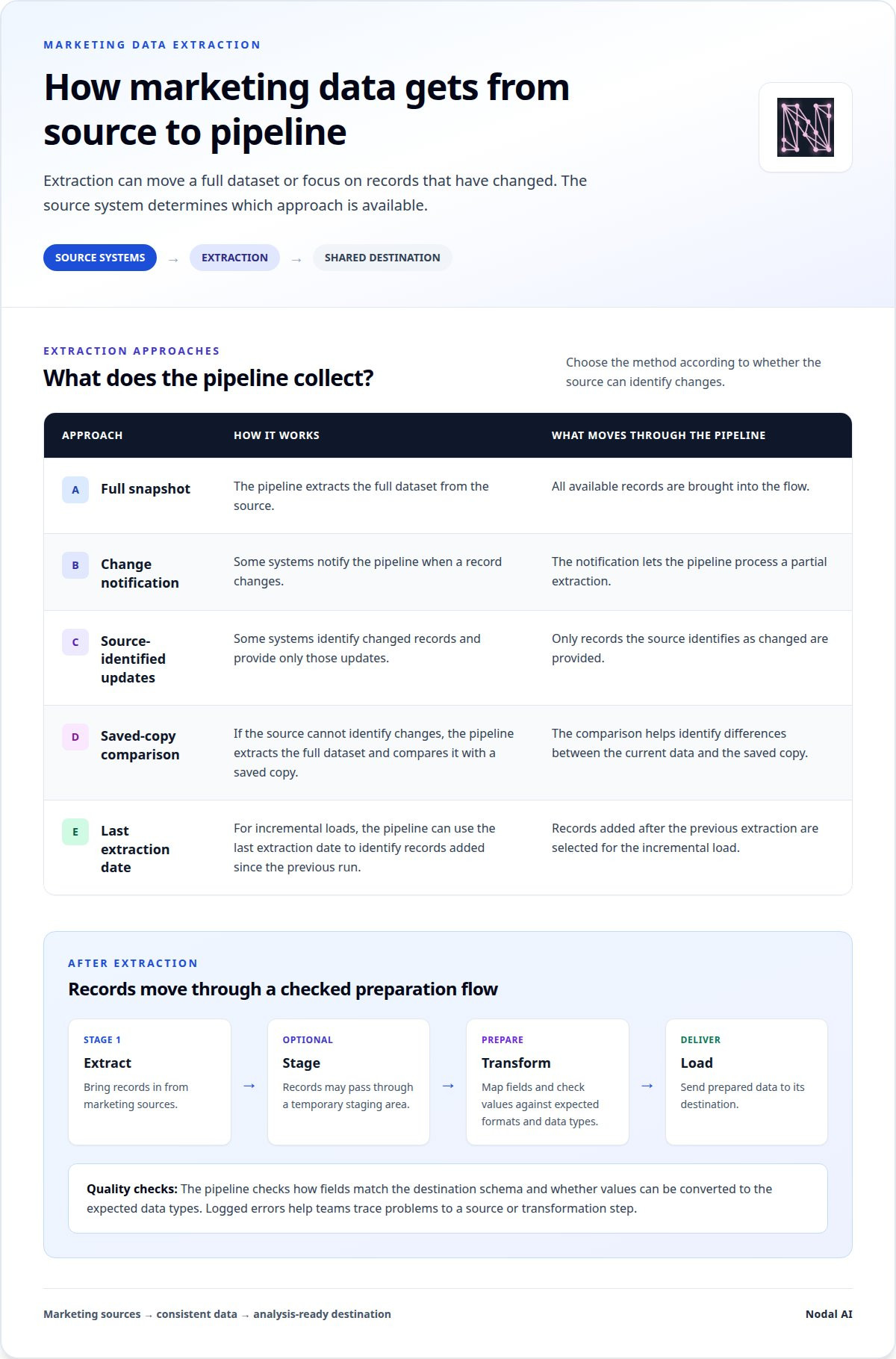
Extraction can take a full snapshot or focus on changes. Some systems notify the pipeline when a record changes, allowing partial extraction. Others identify changed records and provide only those updates. If a source cannot identify changes, the pipeline can extract the full dataset and compare it with a saved copy. For incremental loads, the last extraction date can identify records added since the previous run.
After extraction, records may pass through a temporary staging area before transformation and loading. The pipeline then checks how fields match the destination schema and whether values can be converted into the expected data types. This gives marketers a more consistent basis for reporting and analysis, while logged errors help teams trace problems to a source or transformation step.
Marketing data integration
Marketing data integration connects campaign, customer and analytics records so teams can use them together. For attribution and reporting, model each interaction as a touchpoint, connect it to a customer or conversion using shared identifiers, then apply a consistent credit rule.
That connected view can inform personalised targeting. For example, combining CRM purchase history with social media feedback can help an organisation distinguish first-time prospects from returning customers. A campaign platform can then use audience attributes and activity permitted by its setup to shape relevant segments, rather than relying on one channel’s format or partial view.
Timing matters too. Batch integration moves records on a schedule, which suits recurring performance reports. Near-real-time or real-time workflows move events as they arrive, helping teams respond sooner to recent sign-ups or campaign activity. The right cadence depends on how quickly a decision must follow an event and whether the source system can provide updates at that pace.
Automated Integration and Reporting
Automated integration runs repeatable data transfers and reporting tasks without manual exports for every cycle. A pipeline can collect advertising, CRM and analytics updates, apply mapping rules, and refresh a reporting dataset on a schedule or after a source update. This reduces repetitive handling and gives teams a consistent basis for comparing campaign results.
Automation also needs visibility. A workflow should record failed connections, missing fields and delayed updates, so reporting gaps can be traced to a specific source or step. Teams can set report schedules to match decision needs, such as daily campaign reviews or a near-real-time view of new leads. Integrated analytics capabilities can support a connected view of performance.
Data Models for Attribution and Reporting
A marketing data model defines how records from different platforms relate, giving attribution and reports a shared structure. A practical model can separate customers, campaigns, touchpoints and conversion events, then link them through consistent identifiers and timestamps. This helps analysts follow a journey across channels instead of treating each platform’s report as a separate account of performance.
For example, a campaign table can hold standardised campaign names, while a touchpoint table records the channel, interaction time and customer key. A conversion table can store the outcome and its timestamp. Multi-touch attribution applies a chosen credit approach across those linked interactions, so reporting can compare channels using the same definitions. Clear ownership of field meanings helps prevent teams from interpreting the same metric differently.
Integration tools range from connectors and workflow platforms to custom code. Choose based on source coverage, update frequency, transformation needs, error monitoring and the destination’s required format. A CRM-to-analytics workflow may need different connectors and refresh timing from a reporting flow that combines several advertising platforms.
What are the criteria for choosing ETL tools?
Common choices include cloud-based connectors, enterprise ETL suites, open-source frameworks and custom code. They differ in setup, control, maintenance and how easily their pipelines connect marketing sources with destination databases.
Cloud-based tools suit teams seeking managed data integration across services, such as an advertising platform and a cloud warehouse. Enterprise tools can support broader governance and complex workflows across departments. Their fit depends on existing systems, access controls and the level of operational oversight the organisation needs.
Open-source frameworks offer more control over pipeline logic, but teams must manage configuration, scaling and updates. Custom code can handle a specific transformation that a standard connector cannot, though engineers then need to maintain that code. For example, a team might use SQL transformations to align campaign fields with its reporting schema.
Processing frequency is another choice. Batch tools collect and move data on a schedule, making them suitable for recurring campaign reports. Real-time processing handles events as they arrive, which can support workflows that depend on recent activity. Choose the cadence based on how quickly a marketing decision needs updated data.
Self-service tools give analysts visual interfaces for building integrations with less coding. They can help marketing teams manage routine workflows, such as joining a CRM export with campaign results. More complex pipelines may still need engineering oversight, particularly when custom transformations or dependencies between several sources are involved.
Compare each ETL tool against the work its pipelines must perform:
- Source coverage: Can it connect to the required advertising, CRM and analytics systems?
- Transformations: Can it map fields, change formats and apply the organisation’s data rules?
- Destinations: Does it load data into the databases and reporting systems already in use?
- Operations: Can teams monitor errors, document lineage and maintain the workflows?
- Processing: Does its batch or real-time approach match the reporting need?
For a small workflow that combines two sources for a scheduled report, a cloud connector or self-service tool may fit. A larger enterprise pipeline with custom logic may call for an open-source framework, custom code or an enterprise platform. Match the tool to source complexity, team skills and maintenance capacity, not a feature list alone.
Loading data into warehouses, BI tools, and marketing platforms
Loading is the final ETL stage: transformed records move into a target system in a structured format. Marketing teams can load prepared campaign and conversion data into a data warehouse, business intelligence (BI) tool or marketing platform, depending on how they plan to analyse or use it.
Before loading, ETL tools often place extracted records in a staging area. This temporary holding space lets a pipeline prepare and inspect data before it reaches the target. For example, a staging database can hold processed campaign records while the pipeline checks field types and required values. The staging data may be erased after extraction and loading are complete.
A full load commonly happens the first time a source is connected to a data warehouse. It transfers the source dataset, creating an initial foundation for reporting. Later loads can use incremental updates, adding records created since the previous extraction date. For example, a daily campaign feed can append new conversion events instead of reloading every historic record.
The destination shapes the load design. A warehouse stores prepared data for analysis across channels, while a BI tool turns that data into dashboards and reports. A marketing platform can receive selected audience or campaign information for activation. A team may load detailed records into the warehouse, then send only the fields needed to a platform.
Loading into a staging database before the final target can also support rollback. If a load fails or produces unexpected results, the team can restore the previous target state rather than leave incomplete records in place. ETL can also encrypt sensitive data before it streams to a target database, supporting data privacy compliance.
Before a pipeline writes to its destination, it should account for:
- Schema: Match source fields to the target’s expected structure.
- Load type: Use a full load for initial setup or incremental updates for changed records.
- Destination: Send the prepared dataset to a warehouse, BI tool or marketing platform.
- Recovery: Use staging and error handling to manage failed or incomplete loads.
For example, a pipeline can load standardised campaign, channel and conversion fields into a warehouse, where a BI dashboard compares performance. A separate load can send an approved audience segment to a marketing platform. Keeping each destination’s purpose clear helps teams use data effectively without sending every field everywhere.
Cleaning, standardising, and normalising marketing data
ETL transforms marketing data before loading it; ELT loads raw data first, then transforms it inside the target system. To prepare clean records, validate fields, remove duplicates, standardise formats and log unresolved errors before analytics.
Cleansing and Deduplicating Data
Data cleansing identifies and corrects incomplete, invalid or conflicting values, while deduplication removes repeated records. Both steps matter: duplicate leads can inflate campaign results, and a missing conversion date can distort reporting.
A pipeline can first validate required fields, such as customer ID and event date. It can then compare records using identifiers like email address or CRM ID. Where records share an identifier, rules determine whether to retain the newest record, merge fields or flag the conflict. Logging rejected or changed rows helps teams trace issues to their data sources.
For example, a CRM contact and a lead form submission may describe the same person. Matching them on a shared identifier prevents two records from appearing as separate prospects. The matching rule should preserve meaningful interactions rather than delete distinct actions from one customer journey.
Standardising and Normalising Marketing Data
Standardisation converts values into consistent formats; normalisation organises related data to reduce inconsistency across tables. Both steps matter when platforms describe the same campaign or event differently.
A transformation can align dates to one time zone and format, convert currency fields consistently, and map channel labels to shared categories. For instance, “paid social” and “social paid” can map to one approved channel value. Campaign names can follow a common naming convention, while missing values receive a defined treatment rather than an arbitrary substitute.
Normalising may separate customer, campaign and interaction details into related tables linked by stable identifiers. This structure limits repeated values and clarifies how records relate. Data mapping documents the source field, its destination and the transformation applied, giving analysts a clear path from source values to reports.
Preparing Clean Data for Analytics
Clean, structured data gives analytics and AI systems more consistent inputs. If one platform records a conversion as “purchase” and another uses “order”, a shared event definition helps reports treat equivalent actions consistently.
Before a model or dashboard uses a dataset, validation can check required fields, accepted values and relationships between records. For example, a conversion event without a campaign identifier can be logged for investigation instead of silently assigned to a campaign. Lineage records the data’s source and transformations, making unexpected results easier to trace.
Data pipelines should monitor errors after each transformation, since poor-quality records can pass through undetected and weaken the dataset. A practical sequence is to validate, deduplicate, standardise, map fields, then test the output against reporting definitions. These controls help teams use marketing analytics with clearer measures and more dependable comparisons.
Discuss your marketing analytics needs
Nodal AI: Performance Marketing Analytics
Nodal AI can help when marketing data is available but teams need a clearer view of performance, customer journeys and growth opportunities. Its Performance Marketing Analytics offering helps organisations track results and identify trends, while the Nodal Platform turns fragmented data into actionable intelligence for faster decisions. The value lies in connecting evidence to decisions, not simply producing another dashboard.
Use Performance Marketing Analytics when campaign results sit across different sources and it’s difficult to understand how activity performs as a whole. A unified view can help teams examine channel performance and customer journeys, then use those insights to guide planning. This is useful when teams need to understand what their marketing data indicates rather than manually compiling figures into separate reports.
The Nodal Platform supports this work by bringing fragmented data into a clearer analytical context. It helps make information useful for tracking performance and identifying trends. For example, a marketing team reviewing campaign results alongside customer journey information can use the combined view to understand how interactions relate to outcomes. The platform supports informed decisions from data, rather than replacing the judgement behind them.
Growth Recommendations are useful when a team has performance information but needs help identifying possible next steps. They connect analytical findings with growth-focused opportunities, giving teams a basis for deciding where to investigate or adjust their approach. Recommendations can support planning conversations, while the team remains responsible for assessing them against its goals and business context.
Automated Reporting can help when recurring performance updates take time to assemble or teams need a consistent reporting view. Rather than treating each report as a separate manual task, automated reporting supports a more repeatable flow of marketing information. This can help teams spend less effort compiling updates and more time interpreting what the results mean for their decisions.
- Performance Marketing Analytics: Track performance and surface trends.
- Nodal Platform: Turn fragmented data into actionable intelligence.
- Growth Recommendations: Connect analysis with potential next steps.
- Automated Reporting: Support consistent, repeatable performance updates.
Together, these offerings address different points in the analytics process: understanding performance, bringing data into view, identifying growth opportunities and reporting results. They are most useful when fragmented information or manual reporting makes it harder to see the full picture and act on findings. Contact Nodal AI to discuss your marketing analytics needs.
Make your marketing data work harder
The next step is to decide which marketing decisions your data should support. Start with the questions your team needs to answer, then shape your analytics around those priorities. A well-designed ETL process for marketing data should serve that purpose, not become a technical project without a clear business outcome.
As your channels and reporting needs evolve, revisit whether your data model, processing cadence and quality checks still fit. This keeps your analytics connected to real decisions, from understanding customer journeys to identifying where further investigation may help. Progress doesn’t require every data challenge to be solved at once. A focused first use case can create a practical foundation for what comes next.
Clearer data can give your team a stronger starting point. Take the next step when you’re ready, and keep building towards more confident marketing decisions.
Frequently Asked Questions
How do traditional ETL tools work?
Traditional ETL tools move data through extraction, transformation and loading before it reaches its destination. A tool can collect a full source dataset or retrieve changed records, then apply rules before writing prepared data to a target. For example, a scheduled pipeline might combine advertising records with CRM information, standardise the fields, and load the result into a warehouse for business intelligence reporting.
Why is ETL important?
ETL helps teams use information from separate systems without analysing each source in isolation. A marketing team can bring campaign activity and CRM outcomes into a shared dataset, then investigate which channels are associated with qualified leads. Reliable mappings and validation also make it easier to spot missing or inconsistent records before they affect a report or decision.
Should you use a marketing ETL or go traditional?
Choose based on the sources, transformations and decisions your pipeline must support. A marketing-focused ETL approach is useful when advertising, CRM and analytics data need to connect around campaign performance or customer journeys. A broader traditional ETL setup may suit an organisation that already uses established data infrastructure for several business functions. Compare source coverage, destination compatibility, update frequency and maintenance demands.
What Are the Best Practices for ETL in BI?
For business intelligence, define transformation rules before building reports, then document how each field travels from source to dashboard. Apply validation, error logging and monitoring so missing values or failed loads are visible. Keep data lineage clear, and use governance policies to manage access and consistent definitions. For example, agree what counts as a conversion before comparing that metric across BI reports.
What Is the ETL Process and How Does It Work?
The ETL process extracts data from source systems, transforms it to meet defined requirements, and loads it into a target such as a warehouse. A team might extract customer and campaign records, match their fields to a shared structure, and load the prepared results for analysis. The destination and reporting needs determine which fields, formats and validation rules the transformation must apply.
What Tools and Technologies Power ETL in Business Intelligence?
ETL for business intelligence can use dedicated integration tools or custom code, alongside source connectors, transformation logic and destination databases. A workflow may extract records from business applications, apply field mappings and quality checks, then load the output into a warehouse used by BI reports. Tool selection depends on source compatibility, required transformations, processing frequency and the team’s capacity to maintain pipelines.
What are the benefits of ETL tools?
ETL tools can automate repeatable data movement, reduce manual preparation and create a consistent input for reporting. They can also make errors easier to trace when pipelines include validation and monitoring. For example, a marketing team can use a recurring workflow to prepare campaign records for analysis instead of repeatedly combining separate exports. The benefit depends on suitable source connections and well-defined transformation rules.
What is an ETL process for marketing data?
An ETL process for marketing data collects information from sources such as advertising platforms, CRM systems and analytics tools, then prepares it for a chosen destination. It can align campaign fields, apply agreed definitions and load the results for reporting or further analysis. This process is useful when marketers need connected records to examine performance across channels rather than rely on separate platform views.


