

Revenue leakage often starts in the gaps between systems, not in a single report. To fix fragmented reporting across CRM, POS and ad platforms, align customer and campaign definitions, connect records using consistent identifiers, and assign an authoritative source to each measure. Then compare marketing activity with sales and point-of-sale outcomes using shared reporting logic, so forecasts reflect the same view of the customer journey.
It’s frustrating when CRM pipeline, transaction records and advertising results tell different stories. The answer isn’t simply to add dashboards: it’s to make handoffs between sales, marketing and service visible and consistent. This article explains how disconnected reports can distort forecasts and obscure revenue, what unified reporting can clarify, and how to assess the data, definitions and workflows behind a more dependable view of performance.
Key Takeaways
- Trace where CRM, POS and advertising data diverge, including the reporting logic and hand-offs behind each report.
- Agree on shared customer and revenue definitions so teams compare like with like.
- Choose an integration approach that fits your systems, and pair it with clear data ownership and governance.
- Account for the limits of cross-platform visibility when interpreting campaign results and attributing sales.
- Bring sales, marketing and service into a shared view to make forecasts clearer and performance easier to interpret.
What Is the Real Cost of Fragmented Customer Data?
Fragmented data creates more than inconsistent dashboards. It can obscure revenue, weaken forecasts and consume time through manual reconciliation. Diagnose the sources, reporting logic and handoffs before deciding how to bring the data together.
Diagnosing Fragmented Sources and Reporting Logic
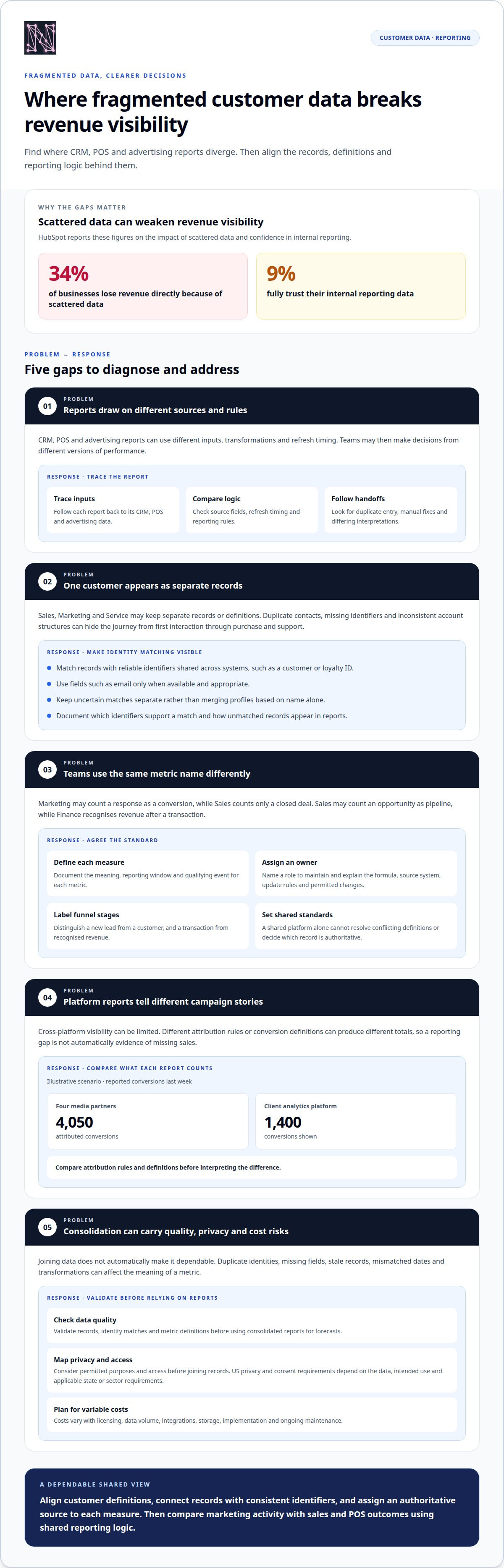
Fragmentation occurs when systems, report definitions, and teams use different versions of customer or performance data. To diagnose it, trace a report back to its CRM, POS, and advertising inputs, then compare transformations and the decisions stakeholders make from it. HubSpot reports that 34% of businesses lose revenue directly because of scattered data, while 9% fully trust internal reporting data.
- Compare source fields, refresh timing, and reporting rules.
- Follow a forecast or lead handoff to find duplicate entry and manual fixes.
- Note where stakeholders interpret the same metric differently.
Departmental CRM Data Fragmentation
Departmental fragmentation occurs when Sales, Marketing, Service and Finance maintain separate customer records or definitions. Sales may count an opportunity as pipeline, while Finance recognises revenue only after a transaction. Marketing may connect a campaign to a lead that Service records under another profile. Review these handoffs alongside CRM reports. Duplicate contacts, missing identifiers and inconsistent account structures can hide the journey from first interaction through purchase and support, leaving each team with only part of the picture.
Metric Ownership and Data Standards
Metric ownership assigns a named role to define, maintain, and explain each important measure. Set one owner for terms such as qualified lead, conversion, and recognised revenue, then document the formula, source system, update rules, and permitted changes. For organisations using Microsoft business applications, Dataverse can provide a structured foundation for customer data and automation. Its value depends on agreed standards: a shared platform alone cannot resolve conflicting definitions or decide which record is authoritative.
Consolidation Costs, Privacy, and Data Quality Risks
Consolidation combines data in a warehouse, customer data platform, integration layer, or reporting model. US privacy and consent considerations depend on the data, its intended use, and applicable state or sector requirements; map permitted purposes and access before joining records. Costs vary with licensing, data volume, integrations, storage, implementation, and ongoing maintenance. Common risks include duplicate identities, missing fields, stale records, mismatched dates, and transformations that change metric meaning. Validate records and definitions before using consolidated reports for forecasts.
Conflicting reports and inconsistent customer definitions
Disconnected records can make the same customer look like separate people across sales, marketing and service dashboards. Shared definitions and careful identity matching help teams read reports consistently and act on the full customer relationship.
Aligning Customer Definitions Across Reports
Customer definitions are the rules teams use to classify people, accounts, leads and outcomes. If Marketing counts a response as a conversion but Sales counts only a closed deal, their dashboards describe different stages, not necessarily conflicting performance. Document each metric’s meaning, reporting window and qualifying event. Label funnel stages clearly so leaders can distinguish a new lead from a customer, and a transaction from recognised revenue.
Disconnected Customer Records and Identity Matching
Disconnected records arise when CRM, POS and advertising platforms store customer activity without a shared identity key. Match records using reliable identifiers shared across systems, such as a customer or loyalty ID. Use fields such as email only when available and appropriate. Keep uncertain matches separate rather than merging profiles based on name alone. This helps prevent one person’s purchases, campaign responses and service history from being wrongly combined.
For example, an in-store POS purchase may be linked to a loyalty account, while an ad platform records an interaction against a device or campaign identifier. A consistent matching method can connect those events when a valid shared identifier exists. Document which identifiers support a match and how unmatched records appear in reports. This makes the method visible to analysts and helps prevent misleading totals.
Incomplete Customer Context in Team Decisions
Incomplete context means each team sees only the interactions stored in its own tools. CRM systems have long aimed to give sellers and account managers a 360-degree customer view, but disconnected records can leave service teams without sales history or marketers without purchase context. The gap affects decisions: Sales may overlook a recent support issue, while Marketing may keep targeting someone who has already purchased.
Customer-service handoffs show the practical impact of fragmented records. If a service agent can’t see a customer’s earlier complaint or purchase, the customer may need to explain the issue again. That friction can weaken retention and obscure whether a campaign brought in a valuable, returning customer. Connect service outcomes to customer records and include relevant context in retention reporting.
Conflicts can also distort campaign evaluation. In an illustrative scenario, four media partners reported 4,050 attributed conversions last week, against 1,400 conversions shown by the client’s analytics platform. Those figures may reflect different attribution rules or definitions. Compare what each report counts before treating the gap as proof of missing sales.
Use a shared customer definition, documented matching rules and clear report labels so teams can make faster decisions from the same evidence.
Point-solution integration failures and stack sprawl
Adding a connector can move records without making reports consistent. Choose an integration design based on the business question, the systems involved and how current the data needs to be for each decision.
Integration Layers, APIs, and Workflow Systems
An integration layer moves or coordinates information between systems, while APIs let applications exchange defined data and workflow systems trigger operational actions. Each addresses a different need, so map the required data flow before adding another tool. For example, a CRM update may need to reach a reporting model, while a service escalation belongs in a workflow. Without clear ownership and error handling, a connection can spread inconsistent records faster.
CRM Integration Versus Consolidation
CRM integration connects existing platforms, while consolidation brings selected data or processes into a shared system. Integration can preserve current tools and improve visibility, but it won’t automatically resolve conflicting customer records or metric definitions. Consolidation can simplify reporting logic, yet moving every record may add complexity without answering a useful business question. Choose based on the workflow: connecting sales opportunities to POS transactions differs from replacing a CRM used by several teams.
The distinction matters when estimating effort and setting expectations. A connector can synchronise selected fields, but teams still need to decide which record is authoritative and how updates should work. A central warehouse, lakehouse, reporting model, catalogue, master data process or workflow application may address different parts of the problem. Choose a structure based on whether leaders need shared analysis, cleaner records or coordinated actions.
Platform Connections for Real-Time Reporting and Accuracy
CRM, POS and advertising connections differ in update timing, available fields and the rules used to record events. A POS feed may capture a completed purchase, while CRM updates reflect sales activity and advertising reports record platform-defined interactions. Real-time reporting depends on how quickly each connection transfers and processes changes. Faster updates alone don’t ensure accuracy: inconsistent identifiers, missing events and mismatched definitions can still distort totals.
For a forecast, define which events need to be current and which can arrive later. Then compare a sample transaction across its source, transfer and dashboard output. This trace can reveal whether a delay comes from the source system, integration schedule or reporting transformation. It also gives teams a practical accuracy test before they rely on the connection for operational decisions.
Tools for Connecting Customer Data
Options for connecting CRM, POS and advertising data include API layers, warehouses, lakehouses, reporting models, catalogues, master data processes and workflow applications. Each serves a different need: an API can pass selected records, while a warehouse can structure data from multiple systems. A workflow application coordinates handoffs rather than replacing analytical reporting. Select an option based on the required data flow, maintenance ownership and decisions the connection must support.
- API layer: exchanges selected fields between applications.
- Warehouse or lakehouse: brings data together for structured analysis.
- Reporting model: applies shared definitions across dashboards.
- Workflow system: routes actions such as a CRM lead handoff.
When CRM systems sit apart from daily Microsoft 365 workflows, employees often perform the integration themselves. That manual work can create duplicate updates and unclear ownership. Map the handoff first, then connect only the data and actions needed to complete it.
Walled gardens and limited cross-platform visibility
Advertising platforms report activity within their own systems, which limits how much of the customer journey appears in one view. An open-garden approach combines available channel data in shared reporting while preserving each source’s distinct definitions and limits.
Why Cross-Platform Visibility Has Limits
Walled gardens are platforms that control their own advertising data and reporting environment. Alphabet, Meta, Amazon, Apple, TikTok, and Microsoft accounted for approximately 78% of global digital advertising revenue in 2022. Their dashboards can report impressions, clicks, and attributed conversions, but those numbers may use different attribution windows or identity signals. Treat each platform’s figures as source-specific, then document how they enter wider reporting.
An open-garden approach creates a common reporting layer without assuming every platform exposes identical data. Bring permitted campaign, CRM and POS fields together, retain source labels and apply shared definitions where comparison is valid. For example, distinguish platform-reported conversions from transactions matched to POS records. This gives leaders context without presenting incomplete visibility as a complete customer journey.
Cross-Channel Reach, Frequency, and Audience Overlap
Reach estimates how many people encountered campaigns, while frequency describes how often they saw them. Compare figures from Meta and TikTok dashboards only when their definitions and measurement methods are compatible. The same person may appear in both platforms’ reach totals, so simply adding them can overstate the combined audience size. Report each platform’s numbers separately when deduplicated cross-channel measurement isn’t available.
Audience overlap measures how much of one channel’s audience also appears in another. Compare overlap only when shared identifiers or compatible aggregated measurements support the calculation. If CRM segments, POS loyalty records and ad audiences use different definitions, label those differences rather than treating the segments as equivalent. This helps marketing teams interpret reach and frequency alongside sales and service context.
Building a Cross-Platform Dashboard
Build the dashboard around decisions, not a long list of available metrics. Define the business question, select source systems, agree on metric definitions, map campaign and transaction fields, connect the feeds, then validate sample records against each source. For online spend and in-store POS sales, use consistent campaign identifiers or matched customer records where available. Compare attributed transactions with spend using a documented attribution method and reporting window.
For cross-departmental reporting, include marketing spend, POS transactions, CRM opportunity stages and relevant service outcomes. Keep source and attribution labels visible so Finance can distinguish booked revenue from campaign-attributed sales. Assess whether unified reporting improves ROI and sales attribution by comparing equivalent periods and definitions. Track matched transaction coverage, unmatched records and attribution changes alongside return calculations. A clearer report makes assumptions visible; it doesn’t turn every platform’s estimate into verified sales.
Unified reporting across sales, marketing, and service
Unified reporting connects sales, marketing and service measures around shared business questions. It gives leaders a clearer view of how campaign activity, customer interactions and transactions relate, without treating every source as identical.
Start with a decision, such as whether marketing is bringing in customers who buy and remain engaged. Bring campaign activity, CRM opportunity stages, POS transactions and relevant service outcomes into one reporting view. Define what each measure means: an ad conversion, qualified opportunity, completed purchase and retained customer describe different events. A shared strategy makes those distinctions visible, so teams can compare outcomes without collapsing them into one metric.
A useful reporting structure connects each team’s contribution to the customer journey:
- Marketing: campaign engagement, spend, and attributed interactions.
- Sales: opportunity progression and pipeline status in the CRM.
- Service: customer issues, resolutions, and recurring themes.
- Finance: recognised revenue and transaction reconciliation.
These views help explain why results differ. A campaign may generate responses, while sales records opportunities later and POS captures completed transactions. Service data can add context, such as whether a purchaser raised an issue before returning. Aligning the stages helps teams spot a broken handoff, distinguish pipeline from sales and understand which outcomes support a forecast.
Unified reporting also changes operational reviews. Instead of asking why three dashboards disagree, leaders can examine where the journey diverged: campaign response, sales follow-up, purchase or service resolution. A forecast can then separate expected pipeline from completed sales and use service patterns to interpret retention. This gives marketing and sales a common basis for decisions, while Finance retains the definitions needed for revenue reporting.
A public-sector organisation in an ILM engagement reduced work that previously took days to work that could be completed in hours after adopting a centralised coordination and reporting system. The example shows how shared reporting can reduce operational friction, though the relevant measures depend on the workflow being coordinated.
Assess the result by comparing the same reporting definitions before and after changes. Track whether teams can reconcile campaign activity with CRM and POS outcomes, explain attribution assumptions and resolve handoffs with less manual effort. If a unified view improves sales attribution, its value should show in clearer decisions and more useful forecasts, not simply in a larger dashboard.
Explore unified reporting capabilities
Nodal AI: Nodal Platform
Nodal AI’s Nodal Platform is an AI-powered analytics platform that turns fragmented business data into actionable intelligence. When CRM, POS and advertising reports leave gaps in performance analysis, Unified Metrics can bring revenue and marketing data into one view. Automated Reporting and AI Growth Insights help teams turn that clearer picture into useful analysis and next steps.
Consider this next step when your team needs to connect marketing performance with customer and revenue outcomes and has defined the reporting questions it needs to answer. The platform helps organisations track performance, identify trends and make faster decisions, while clear data definitions and ownership remain essential.
Explore the Nodal Platform to see how it can support your reporting needs.
Make Your Next Reporting Decision Count
Choose one decision that currently depends on competing reports. Define what evidence would make it clearer, who needs to act on it and how the result will be assessed. That focus turns the question of how to fix fragmented reporting across CRM, POS and ad platforms into a purposeful improvement, rather than another broad technology project.
Keep the first objective specific. For example, clarify how marketing activity informs a sales forecast, or how customer outcomes shape retention decisions. Use that objective to guide reporting changes, then expand when teams can act on the shared view with confidence. Progress comes from making information useful, not simply making more of it visible.
If you’re ready to connect reporting improvements with business decisions, Nodal AI’s Nodal Platform, Performance Marketing Analytics and Growth Recommendations can support that work.
Start with the decision that matters most, and give your teams a clearer path forward.
Frequently Asked Questions
How Does CRM Fragmentation Cause Revenue Leakage and Forecasting Errors?
CRM fragmentation hides relationships between customer activity, opportunities and completed purchases. For example, if a returning buyer appears as a new lead, sales teams may overstate acquisition and undercount repeat revenue. Forecasts can also miss late-stage changes when updates sit in separate records or spreadsheets. Compare opportunity stages with closed transactions and investigate unexplained gaps before using pipeline totals to guide spending or staffing decisions.
What Does a Single Customer View Actually Deliver?
A single customer view brings relevant interactions into a connected profile, helping teams understand context beyond one channel. A sales representative could see a previous purchase and an open service issue before discussing renewal. Marketing could distinguish an existing customer from a prospect before sending an acquisition message. The view is useful when records are linked carefully and access reflects each team’s role, rather than exposing every field to everyone.
Why Does CRM Fragmentation Block AI Readiness?
Fragmented CRM data makes it harder for AI systems to learn from consistent examples. If one team labels a record “qualified” and another uses the same label for a different stage, analysis can compare unlike cases. Duplicate profiles may also give one customer’s actions extra weight. Before using AI for forecasting or segmentation, align labels, remove or flag unreliable records, and preserve the context behind important fields.
What causes fragmented reporting across CRM, POS, and advertising platforms?
Fragmentation often starts with separate systems designed for different work: a CRM tracks relationships, a POS records transactions, and advertising platforms measure campaign activity. It grows when teams use different customer identifiers, naming conventions, time periods or conversion definitions. For instance, an ad click and a POS purchase may describe related activity, but without a shared method for connecting them, reports show separate events rather than a traceable journey.
How can CRM, POS, and ad platform data be unified in a single reporting system?
A practical answer to how to fix fragmented reporting across CRM, POS and ad platforms is to connect relevant records while preserving source definitions. Choose the business decision the report must support, then identify the necessary fields from each platform. Map identifiers and event dates, and bring selected data into a shared reporting environment. Test a sample journey from campaign interaction to POS purchase, keeping source labels and transformation rules visible.
How should teams standardise metrics, naming conventions, and campaign tags across platforms?
To understand how to fix fragmented reporting across CRM, POS and ad platforms, create a shared data dictionary that defines each metric, field and campaign tag. Specify what counts as a conversion, how campaign names identify channel and objective, and which dates govern reporting. Assign an owner to approve changes and maintain definitions. Apply the agreed pattern to new campaigns, then map older names where possible while preserving original values for traceability.
What privacy, consent, and data security rules apply when combining CRM, POS, and ad data in the United States?
US privacy and consent considerations depend on the data, its intended use, and applicable state or sector requirements. Map permitted purposes and access before combining records, and define appropriate access and security controls for the data.


