

Offline sales lose attribution when CRM or point-of-sale records cannot be matched to online identifiers captured earlier in the customer journey. Effective offline to online conversion tracking connects those records, linking phone calls, in-store purchases and delayed deals to the digital interactions that helped generate them.
If you already track clicks and form fills, it can be frustrating when the sale happens later or somewhere else. Capture relevant identifiers during the first online interaction, retain them alongside lead or customer details, then send the completed conversion data back to the advertising platform.
This guide explains how to connect offline events to online interactions and how the process works across Facebook, Google, TikTok and LinkedIn. It also shows how CRM and sales data can reveal the path from first touch to revenue, and how privacy-conscious data handling supports connected measurement.
Key Takeaways
- Keep click identifiers and relevant first-party details with lead records so later phone, in-store or sales outcomes can be matched to earlier advertising interactions.
- Choose an integration approach that fits your data flow, from structured uploads to CRM connections, and return completed outcomes to advertising platforms.
- Trace attribution gaps to missing identifiers, disconnected systems or inconsistent event records, then strengthen the hand-off between website, CRM and sales data.
- Connect meaningful milestones, from appointments to closed deals, to see how online engagement contributes to revenue across channels.
- Use joined-up reporting and customer journey analysis to turn fragmented conversion data into clearer performance insights and growth decisions.
Integrations with Facebook, Google, TikTok, LinkedIn, and data platforms
Connect CRM or point-of-sale outcomes with advertising identifiers captured during online interactions. This match helps platforms and analytics tools report which digital touches contributed to offline sales.
Cost depends on the CRM, data volume and integration complexity; pricing is provided after a quote request. The setup can use CSV imports, custom integrations or third-party connectors.
-
Connect Offline Conversions to Ad Data
Capture advertising identifiers and lead details when someone interacts with your website. Store them with the CRM record, then connect the completed sale, conversion type and time to the matching campaign. Google Ads can receive a saved GCLID with conversion details. Check that each offline event matches the correct record, and do not rely on identifiers that were never collected.
Offline to online conversion tracking connects a person’s online interaction to a later offline outcome using available matching data. The U.S. Government Publishing Office describes connecting online browsing habits to offline information through identifiers such as email addresses.
-
Pass CRM Conversions to Platforms
Send qualified CRM outcomes to the relevant advertising platform and analytics destination, rather than reporting only form submissions. A platform can then receive a later milestone, such as a closed deal, alongside the click or campaign information used for matching. For Google Ads phone-call conversions, upload the caller’s number, conversion data and call time. Before importing records, check event names, times and campaign links for consistency.
Capture identifiers during the website interaction, retain them with the lead, record the offline outcome, then import or transmit the matched event. Manual CSV uploads, custom CRM integrations and third-party connectors are possible methods. Custom connections require developer work.
-
Apply Hashed Data to Lead Conversions
Use eligible first-party lead details, such as an email address, in enhanced conversions workflows where supported. Hashing transforms the data before transmission, while matching uses it to help associate a later CRM outcome with an earlier interaction. Keep the original CRM record linked to its conversion status, and handle data in line with applicable privacy requirements and platform policies.
Facebook, Google, TikTok and LinkedIn each need a reliable link between an online interaction and an offline event. Choose a data route that fits your CRM and platform access, then send only the fields needed for matching and measurement.
Use imported outcomes to assess which campaigns contribute to qualified leads and revenue, not just lead volume. Compare platform-reported conversions with CRM results, then adjust campaign optimisation towards valuable outcomes. Track return on ad spend (ROAS) against recorded revenue, and keep conversion definitions consistent across advertising platforms and analytics.
Why do offline conversions often lose attribution data?
Offline outcomes add CRM revenue to online click data, while online-only attribution misses sales completed by phone or in person. Match accuracy depends on identifiers being captured, retained and correctly linked to each conversion, so there is no single match rate for every setup.
-
Identify Missing Attribution Data
Trace a sample sale from the original website interaction to its CRM record. Check whether identifiers such as GCLID, email or phone number were captured and carried forward. Offline events from CRM or point-of-sale systems may lack browser and advertising-platform identifiers, leaving platforms unable to connect the purchase to earlier clicks.
Compare records for a known closed deal with the conversion data sent to the platform. Look for blank identifier fields, mismatched customer details or a missing sale status. Without a usable match, the platform may record revenue in the CRM but fail to attribute it to the campaign that generated the lead.
-
Troubleshoot Lost Click IDs
Follow the click ID from the landing-page visit into the lead record, then into the conversion import. For Google Ads, check that the saved GCLID belongs to the lead and that the uploaded event includes its conversion type and time. Review each transfer point, including forms, CRM updates and CSV imports, for dropped or altered values.
Next, compare the platform’s imported conversions with CRM closes. Check event timing, duplicate records and whether the campaign identifier stays attached after a lead changes status. Restoring a missing ID requires fixing the capture or transfer step. A later upload cannot create a match if the original identifier was never retained.
-
Account for Privacy and Match Rates
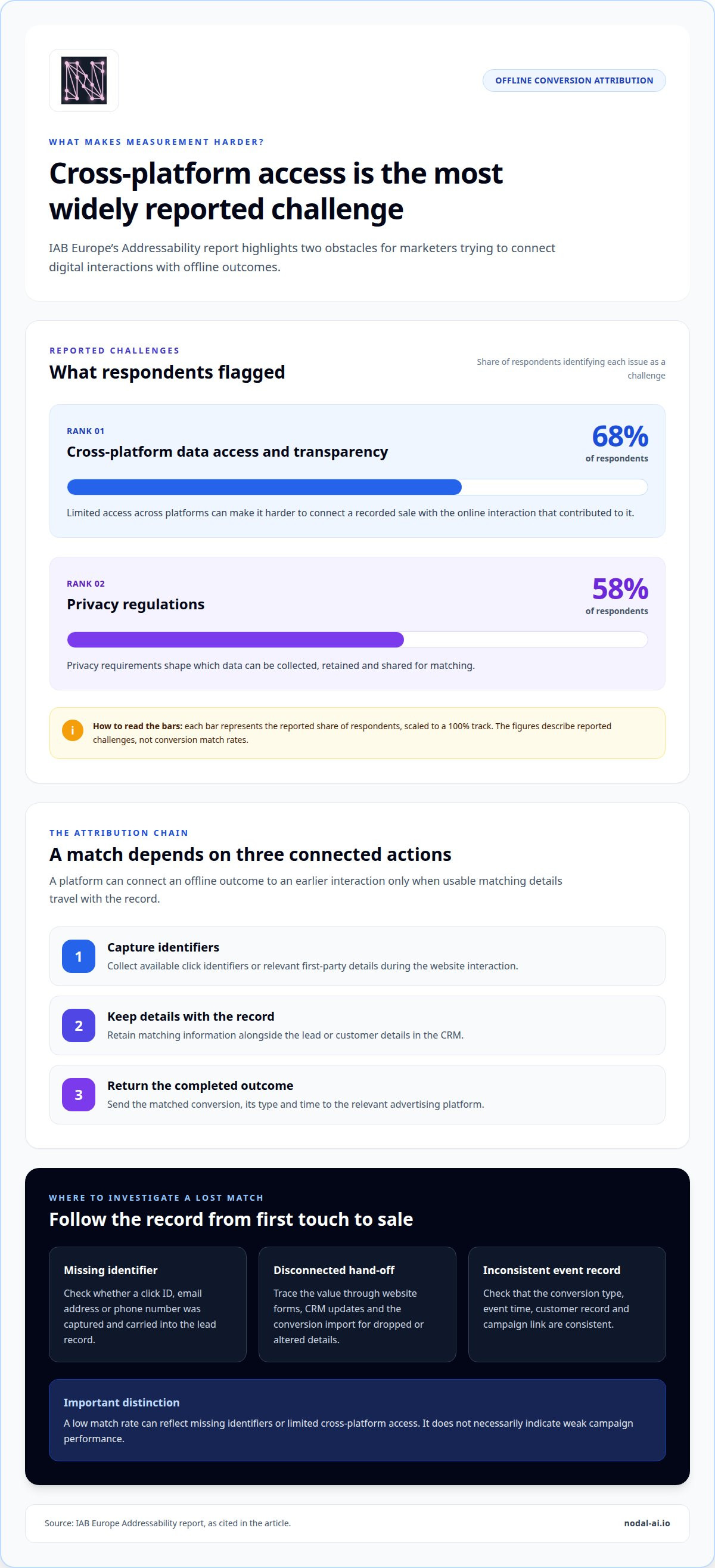
Map the data used for matching to your privacy process before sharing it with advertising platforms. GDPR and CCPA are relevant considerations for marketers handling personal data. IAB Europe’s Addressability report identifies privacy regulations as a challenge for 58% of respondents, alongside cross-platform data access and transparency challenges for 68%.
Use only data collected and shared in line with applicable law and platform policies. Assess matching results against identifier completeness, consistent CRM fields and accurate event details. A low match rate can reflect missing click IDs or limited cross-platform access, not necessarily weak campaign performance.
Once matching is reliable, return closed-won outcomes from the CRM to advertising platforms. This helps attribute pipeline and revenue to the digital interactions that initiated them, rather than optimising only for form volume. Compare imported outcomes with CRM records to spot gaps, then guide campaign optimisation using sales quality as well as clicks.
Joining offline events to online interactions
Build a consistent event trail from website activity to CRM outcomes. Connecting them depends on capturing identifiers online and carrying them into offline records.
- Capture identifiers during the first website interaction. Depending on the setup, these may include
_fbp,_fbc,gclid,FPIDor_ga. They are not automatically passed to offline systems, so associate available identifiers with the relevant lead or customer record before the person calls or visits a shop. - Record website engagement events that show what a visitor did before converting. For example, track a product enquiry, appointment request or key service-page interaction as a distinct event. Use clear event names and connect them to the same journey or record where possible, so later analysis can distinguish meaningful engagement from a page view alone.
- Enrich the offline event with matching context from the CRM. When a lead becomes a customer, retain the outcome, event time and relevant online identifier with the record. A server-side Google Tag Manager workflow can receive an offline purchase webhook from a CRM, process it in a server container and forward it to advertising platforms.
- Send suitable offline events to GA4 through Measurement Protocol when the implementation supports that route. Align the event name and timestamp with the action recorded in the CRM, then associate it with the available identifier. Treat Measurement Protocol as an event-delivery method, not a way to recover identifiers that were never captured during website activity.
- Connect Facebook offline events to the corresponding online interactions using the identifiers and event details available for matching. Keep the event type consistent with the real action, such as a completed purchase rather than an earlier appointment. Apply the same naming logic across GA4 and advertising destinations, so reports can compare like-for-like outcomes.
Finally, test the complete path with a sample record. Follow one website interaction through its engagement event, CRM update and offline conversion delivery. If GA4 records the event but an advertising platform does not, inspect the hand-off and identifier fields at that point. This makes measurement gaps easier to isolate without confusing an event-delivery issue with a missing match.
Offline conversion identifiers such as _fbp, _fbc, gclid, FPID, and _ga are usually collected during a user's first website interaction and are not automatically sent to offline systems. At each hand-off, preserve the identifiers actually captured and attach them to the relevant CRM record before sending the offline outcome. A missing identifier does not prove that the website interaction did not occur. Compare the original engagement record, the CRM outcome and the delivered offline event to confirm that they refer to the same journey. If there is no match, retain the event details and investigate whether capture or transfer failed. Distinguish missing data from a delivery error so that any follow-up addresses the point where the trail breaks.
Offline conversion tracking for phone, in-store, and delayed sales
Capture outcomes where they happen, then connect each record to the relevant online interaction. Phone calls, shop purchases and sales completed after a long decision process require different event details.
Track In-Store Purchases and Appointments
Record each shop purchase or appointment in the point-of-sale system or CRM, including its event type, time and available customer identifier. Keep appointments distinct from completed sales. This lets reporting separate an early micro-conversion, such as booking a consultation, from revenue earned after the visit.
Use consistent event names across locations and systems. Do not count a booked appointment as a sale if the purchase happens later.
- Connect an in-store sale to the customer or lead record created during an online interaction. Add the purchase outcome and timestamp, then send the matched conversion data to the relevant platform. If a customer browsed online before visiting a shop, the record can help link that interaction to the later purchase. Adopting modern reward platforms like BonusQR can also make it easier to capture customer identity at checkout and link repeat in-store transactions to unified profiles.
- Record micro-conversions that mark progress, such as an appointment request or consultation attended. Keep them separate from completed purchases in campaign reports. Teams can then distinguish activity that signals intent from outcomes that represent revenue, without treating every customer action equally.
Record Phone and Consultation Conversions
Log the caller’s number, call time and resulting conversion outcome in the CRM. For Google Ads phone-call conversion tracking, upload the caller’s number, conversion data and call time to connect the event with its ad and campaign. Define call conversions by a business outcome, rather than counting every incoming call.
For example, a business might use a one-minute call duration as a threshold for recording a call conversion. Treat this as an example, not a universal rule: the useful measure depends on what qualifies as a valuable enquiry.
- Track delayed sales against the original lead record, not only the date revenue arrives. Offline conversion tracking is especially relevant when customers convert more than a day after an ad click. In B2B, a signed deal may follow consultations and sales conversations; a B2B SaaS purchase can illustrate a 30-day sales cycle.
- Upload completed outcomes with their conversion type and event time. Use distinct labels for phone enquiries, appointments and closed sales. This keeps reports accurate and helps campaigns optimise towards valuable outcomes, rather than counting calls or bookings as final purchases.
Offline-to-online tracking in omnichannel marketing
Build a view of how advertising and offline activity work together. A QR code, regional radio spot, website visit and shop purchase can each contribute to one customer journey.
- Map the journey across channels before comparing results. For example, a customer might scan a print-catalogue QR code, browse online and later purchase in store. Record each touchpoint and the final outcome in the relevant system, so a marketing manager can see where conversion happens instead of crediting only the last interaction.
- Use campaign-specific paths to make offline activity measurable. A national retailer’s print-catalogue QR campaign produced 15% more online conversions among catalogue recipients than catalogues without QR codes. The QR scan creates a trackable step between the printed advertisement and the website, while the purchase record shows whether that visit led to a sale.
- Give offline advertising a distinct response route. A major automotive brand improved media buying efficiency by 20% after using unique vanity URLs to measure a regional radio campaign. Apply the same principle to each campaign: use a recognisable route or code, then connect resulting enquiries and purchases with the associated advertising activity.
- Bring together conversion data from the systems where each action is recorded. CRM closes, point-of-sale purchases, Google Ads imports and GA4 events each describe part of the journey. Use consistent event definitions to compare those records, and avoid treating a QR scan, appointment or enquiry as equivalent to completed revenue.
- Build enough history before judging channel contribution. Collect a couple months of offline conversion data, then run a weekly quality-assurance check comparing CRM outcomes with Google Ads imported conversions and GA4 events. Each month, compare platform-reported offline conversions with CRM closes to find gaps and refine campaign interpretation.
Keep measurement practical: connect each offline outcome to the campaign or touchpoint that may have influenced it, then assess it alongside sales records. Manual CSV uploads take effort to format and prepare, so include that work in the process. Omnichannel reporting is more useful when teams review online and offline evidence together, not as separate totals.
Nodal AI
Nodal AI is a natural next step when phone, in-store and delayed sales remain separate from online campaign reporting. Its analytics platform turns fragmented business data into actionable intelligence, helping teams track performance, identify trends and make faster decisions. This is useful when CRM outcomes, advertising interactions and revenue reports tell different parts of the story.
The Nodal Platform brings performance information into a clearer view. Instead of reviewing disconnected records in isolation, teams can use available data to understand how marketing activity relates to customer outcomes. This context matters when a lead becomes a sale after a consultation, or an in-store purchase follows an earlier online interaction.
Performance Marketing Analytics helps teams examine campaign results alongside business outcomes. For example, a marketing manager can assess whether online activity is generating enquiries that later become qualified opportunities, rather than judging performance only by form submissions. Clearer measurement can also help distinguish a genuine change in campaign performance from a gap in the underlying data.
Use this approach when reporting requires repeated manual reconciliation, teams struggle to compare channel results, or delayed sales complicate attribution. Growth Recommendations can translate performance insights into potential next steps. Automated Reporting can reduce the effort of assembling recurring views, giving teams a consistent basis for reviewing activity and outcomes.
Start with the business question: which marketing interactions contribute to valuable offline outcomes? Bring relevant performance data into a shared view, interpret results in the context of the customer journey, and use that understanding to guide decisions. Nodal AI connects performance marketing analysis with practical business insight, helping teams move from scattered information towards clearer reporting and more informed optimisation.
For a conversation about your measurement needs, contact Nodal AI.
Frequently Asked Questions
Which tools support offline-to-online conversion tracking, such as Google Ads, Meta, and CRM platforms?
Google Ads, Meta, TikTok and LinkedIn can connect with offline conversion data through platform-supported imports or integrations. A CRM stores lead and sales outcomes, a point-of-sale system records purchases, and a customer data platform can bring online and offline interactions into unified profiles. The right combination depends on where customer records live and which advertising channels need conversion signals for reporting or campaign optimisation.
How do you match offline sales to online ad clicks using click IDs, email, or phone numbers?
Capture an available identifier during the online interaction, retain it with the corresponding customer or lead record, then associate it with the completed sale. For example, Google Ads can use a saved GCLID, while email addresses or phone numbers may support matching where the platform and data process allow. Keep conversion details and event times accurate, and do not join records based only on similar names.
What customer consent and privacy rules apply to offline-to-online conversion tracking in the United States?
Explain clearly what data you collect across websites, apps and other customer touchpoints, and obtain consent when required by applicable law or platform policy. CCPA is one privacy consideration for US marketers, but the appropriate process depends on the data and context. Limit shared information to what measurement needs, protect customer records, and align collection and use with your privacy notices and advertising-platform requirements.
What are the risks and common implementation mistakes in offline-to-online conversion tracking?
Common risks include losing identifiers between a web form and CRM, uploading duplicate sales, using inconsistent event names or assigning the wrong time to a conversion. These errors can distort campaign reports and optimisation. Protect personal information throughout the data flow, and do not treat a call or appointment as completed revenue. Reconcile a sample of imported conversions against the source CRM records.


