

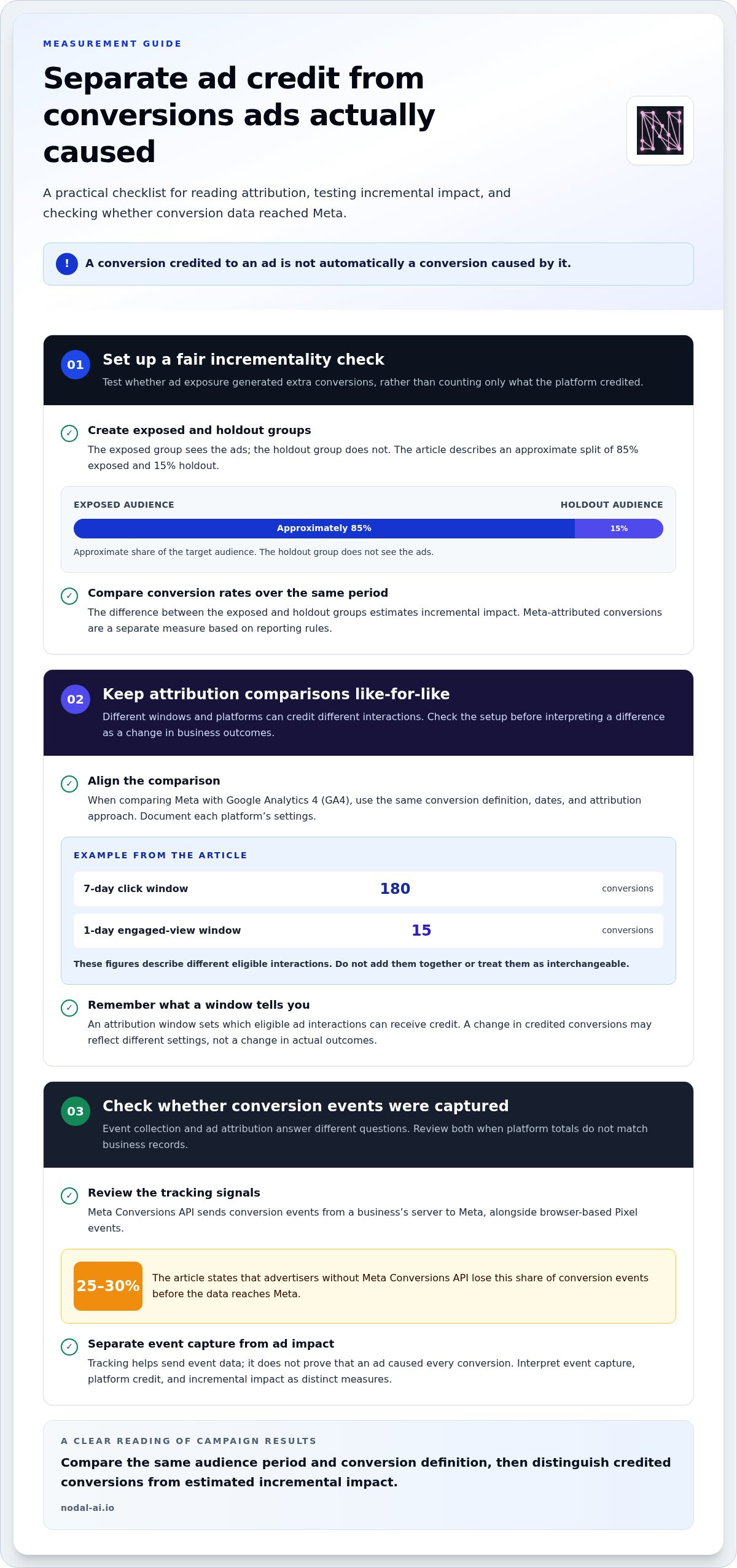
A conversion credited to an ad isn’t automatically a conversion caused by it. Meta Ads attribution uses time windows to decide whether a click or view can receive credit for a later conversion, and Meta removed the 28-day click attribution window after iOS 14. The window changes what appears in reporting, not necessarily what drove the sale.
It’s easy to see why the numbers can seem inconsistent. Someone may see an ad, return later through another channel, then buy, while attribution methods assign credit differently. Understanding those rules helps you interpret campaign results with confidence.
This guide explains how attribution windows work, how incremental measurement can distinguish ad influence from conversions that might have happened anyway, and why delayed purchases and last-click reporting tell different stories. You’ll also learn how video views can receive conversion credit and what to consider when comparing Meta’s reported results with the wider customer journey.
Key Takeaways
- Choose an attribution window that reflects how quickly people typically decide, rather than treating every conversion window as interchangeable.
- Separate conversions credited to ads from conversions the campaign actually caused by using incremental measurement.
- Compare delayed ad influence with last-click credit to see how the final interaction can obscure earlier touchpoints.
- Account for tracking gaps and reporting changes when interpreting campaign results or adjusting optimisation.
- Understand when a video view can receive conversion credit before judging the role of video ads in the customer journey.
What are Meta Ads attribution windows in 2026?
Meta Ads attribution credits a conversion to an eligible ad interaction within a selected time window. Click-through attribution counts an action taken after someone clicks, while the window determines how long that click can receive credit.
Click-Through Attribution Windows
A click-through attribution window is the period after an ad click during which Meta can attribute a conversion to that click. It matters because a purchase outside the selected window may not appear as an ad-attributed conversion, even if the person clicked earlier.
Meta removed the 28-day click attribution window after iOS 14. A shorter window focuses reporting on conversions that follow more closely after a click. For example, a one-day click window counts an eligible conversion within one day, while a purchase later falls outside that window. The reported result therefore depends partly on the attribution settings, not only on campaign performance.
Matching Windows to Sales Cycles and Goals
Choose a window that fits the buying cycle and campaign goal. A quick decision, such as claiming a free offer that requires no deliberation, may suit one-day click-through attribution. For a low-cost impulse purchase, test a one-day click window and compare its reported conversions with the campaign goal.
A longer consideration process can mean more time between a click and a purchase. A short window may miss delayed conversions, while a broader one may credit more conversions to earlier clicks. During sales periods, the guide recommends one-day click and one-day view attribution so Meta can learn and optimise quickly. Keep the goal consistent when comparing strategies, or a window change may look like a change in demand.
Attribution Windows and Ad Delivery
An attribution window affects which conversions Meta can use as feedback to optimise ad delivery. That feedback helps the system identify interactions associated with the campaign’s conversion goal. The window therefore shapes both what appears in reports and which conversion signals are available for optimisation.
During a sales period, the recommended one-day click and one-day view setting gives Meta a shorter feedback period, supporting faster learning around near-term conversions. A one-day click window for an impulse purchase similarly keeps the credited action close to the click. Compare results using the same window across campaigns; otherwise, differences in attributed conversions may reflect settings rather than delivery.
Supported Attribution Settings
Available attribution settings include click-through and view-based windows, depending on the campaign setup. Examples include one-day click, one-day view, and their combination for sales periods. A one-day click-through setting can also suit a free offer that requires no deliberation.
Treat the campaign’s attribution setting as a reporting frame, not proof that an ad caused every credited conversion. For an impulse purchase, test the one-day click window; for a sales-period campaign, use the recommended one-day click and one-day view combination. Then compare like with like. Facebook campaign reports are easier to interpret when the window, conversion goal, and evaluation period remain consistent.
How incremental attribution measures ad-driven conversions
Incremental measurement asks whether ads generated extra conversions, not simply whether Meta recorded credit. Compare Meta and Google Analytics 4 (GA4) using the same conversion definition, dates and attribution approach. Meta and GA4 can report different totals because their attribution windows, channel-credit rules and available tracking signals may differ.
Measuring Incremental Conversions
Incremental attribution estimates ad-driven conversions by comparing outcomes for people exposed to ads with outcomes for a comparable group who weren’t exposed. This matters because a conversion credited to an ad might have happened without it.
A holdout test separates an exposed audience from a control audience. The exposed group represents approximately 85% of the target audience; the holdout group represents approximately 15% and doesn’t see the ads. Compare their conversion rates over the same period. The difference estimates incremental impact, while Meta’s attributed total reflects conversions credited under its reporting rules. Treat these as distinct measures.
Conversion Credit Across Attribution Windows
An attribution window determines which eligible ad interactions can receive credit for a conversion. Comparing windows shows how reported performance changes when the credit period changes.
For example, a hypothetical vitamin-gummy campaign records 180 conversions under a 7-day click window and 15 under a 1-day engaged-view window. Those figures describe different eligible interactions, so they shouldn’t be added or treated as interchangeable. To compare Meta with GA4, align the conversion event and reporting dates, then document each platform’s attribution settings. A campaign manager can then separate differences in credited conversions from changes in actual business outcomes.
Server-Side Tracking with Conversions API
Meta Conversions API sends conversion events from a business’s server to Meta, adding server-side tracking alongside browser-based Pixel events. Incomplete event signals can leave Meta with fewer recorded conversions.
Advertisers without Meta Conversions API lose 25-30% of conversion events before the data reaches Meta. That can widen the gap between business records and platform reporting. Treat the API as a way to send event data, not as proof that every conversion was caused by an ad. When reviewing totals, distinguish event capture from attribution: one concerns which conversions Meta receives, the other concerns which eligible interactions receive credit.
Holdout Groups and Conversion Comparisons
A holdout group is an audience segment kept from seeing ads, so its conversion results can be compared with those of the exposed group. This makes it useful for testing whether a campaign creates lift beyond credited conversions.
Compare both groups over the same period and use the same conversion definition. If the exposed group converts more often, the difference provides an estimate of incremental conversions. Keep the groups comparable, since differences in audience composition can affect the result. For teams comparing channel results, cross-channel performance insights can help bring campaign measures into a clearer view.
Delayed attribution versus last-click attribution
A customer’s path from Facebook ad to purchase can span several interactions. Delayed attribution accounts for a conversion after an earlier qualifying interaction, while last-click attribution credits the final eligible click. The model you use changes which channel appears responsible.
Consider the jeans example: someone sees a Facebook ad, then buys the jeans three days later. Delayed attribution can recognise the earlier ad interaction if it qualifies under the attribution window. A last-click model may instead credit a later click from another channel, such as a search result. The sale is the same, but the attribution model tells a different story.
That difference can shape decisions. If a team judges Facebook only by last-click results, an ad that introduced the product may appear to have contributed nothing. If it relies only on delayed ad credit, it may overlook the search or email interaction that completed the purchase. Compare both perspectives using the same conversion event and reporting dates to get a clearer view of each channel’s role.
Click-through attribution ties credit to a person clicking an ad before converting. Engage-through attribution considers an eligible ad engagement, such as a video view, before conversion. These are distinct paths to credit, so a view-based conversion shouldn’t be treated as a click. Meta’s reporting can include different eligible interactions depending on the selected settings and campaign format.
Clicks can also describe different actions. A link click records a click on a link within an ad; an outbound click records a click that takes someone away from Meta properties. For example, someone might tap an ad element that opens another destination within Facebook rather than visit the advertiser’s website. Comparing link clicks with outbound clicks distinguishes interest in ad links from traffic leaving Meta.
Use a consistent comparison across platforms. First, define the conversion, such as a completed order. Next, note whether each report uses click-through, engage-through, or last-click credit. Then compare the same date range and conversion event. A default report is a starting point, not a universal answer: Meta and another platform may assign credit differently to the same customer journey.
For a practical assessment, pair the platform’s credited conversions with the sequence of touchpoints. If Facebook introduced the jeans and search completed the sale, last-click alone hides the earlier influence. If the purchase happened outside the selected window, the ad may receive no credit. Keep these distinctions visible to make campaign comparisons more useful for budget decisions.
Limitations, learning periods, and campaign disruption
Meta reporting can change when tracking signals, attribution settings, or campaign changes affect the data. Common errors include comparing different windows, conversion events, or date ranges. Align those settings before interpreting a difference.
Learning Periods and Campaign Disruption
A learning period is when Meta’s delivery system uses campaign results to adjust who sees an ad. Campaign changes can affect the signals used for optimisation, making performance harder to compare across periods.
For example, changing the conversion event and attribution setting together can make a reporting shift reflect both changes. Record each edit and its date, then compare performance after changing one thing at a time. This separates delivery changes from changes in how conversions receive credit. Advertisers can then avoid treating every short-term movement in reporting as evidence that a campaign has improved or declined.
Attribution changes can also disrupt comparisons even when delivery stays constant. Meta removed the 7-day view attribution window and 28-day view attribution window after iOS 14. A report using those earlier windows won’t be directly comparable with one using different settings. Record the active window beside campaign results, especially when comparing older and newer models.
Cross-Device and Cross-Platform Limits
Cross-device tracking connects interactions on different devices to the same person, while cross-platform tracking compares activity across services such as Meta and Google Analytics 4. These connections can be incomplete, so a customer journey may appear as separate visits or conversions.
Someone might view a Facebook ad on a phone and later buy on a laptop. If systems can’t connect those interactions, Meta and another platform may report different credit for the same order. Eighty-five per cent of consumers now use three or more devices, making consistent cross-device measurement important. Compare conversion definitions and date ranges first, then check whether each platform uses the same attribution approach. Different totals don’t automatically mean a report is incorrect.
IOS 14.5, ATT, and Tracking Limits
Apple implemented App Tracking Transparency (ATT) in 2021, changing how tracking permissions work on iOS. After iOS 14, Meta removed the 7-day and 28-day view windows, limiting comparisons with reports built under those settings.
Seventy-five per cent of iOS users opted out of tracking after ATT’s introduction. With fewer observable signals, some interactions may not appear in platform reporting or be connected to a later conversion. Attributed totals are therefore a partial view of campaign activity, not a complete record of every customer journey.
Use a consistent comparison routine: confirm the conversion event, attribution window, and reporting dates, then note any campaign edits. If Meta’s reported conversions shift after a settings change, compare reports using the same settings across periods where possible. This helps distinguish a measurement change from a change in campaign outcomes.
Engaged-view attribution for video ads
Engaged-view attribution can credit a video ad when someone watches it, then converts without clicking. Meta distinguishes qualifying video engagement from a click, so a Facebook ad can receive credit even when the viewer later visits another way. That credit indicates a reported connection, not proof that the video caused the conversion.
Meta’s engage-through attribution includes video views of at least 5 seconds. Engaged-view attribution can credit a conversion after someone watches a skippable video ad, even without a click. These thresholds describe different attribution criteria. Read the label in Ads Manager carefully, rather than treating every view-based result as the same measure.
A 1-day view window limits the time between an eligible view and a conversion. For example, if someone watches a qualifying skippable ad and converts within that day, the conversion may receive engaged-view credit. A later purchase falls outside that particular window. The reported count therefore depends on both viewing behaviour and the selected attribution setting.
Use view-through reporting to assess video’s role across buying cycles, not as a substitute for click-through results. Someone may watch a product demonstration, remember the offer, then return through search or a bookmarked page. Click-based reporting may credit the later interaction, while engaged-view reporting can recognise the earlier video exposure when it meets the applicable criteria.
For a clear performance assessment, separate conversions credited after clicks from those credited after views. In Ads Manager, compare the same conversion event and reporting period, then note the view threshold and window shown for each result. If a campaign uses both video and static ads, analyse the formats separately. Otherwise, a high view-attributed total can obscure which interaction preceded the conversion.
View credit also needs context. Someone can watch an ad without deciding to buy at that moment, so compare reported conversions with broader campaign outcomes and other customer touchpoints. If video views rise but conversions don’t, attention and action are moving differently. Check the window and qualifying view criteria before drawing conclusions about the campaign.
For multi-touch analysis of video and other campaign interactions:
Explore customer journey mapping
Nodal AI: Nodal Platform
Nodal AI’s Nodal Platform brings fragmented marketing data into a clearer performance view. When Meta’s credited conversions don’t explain how paid social contributes across customer journeys, Performance Marketing Analytics and Multi-Touch Attribution help compare interactions across channels. Automated Reporting makes recurring results easier to review, while Growth Recommendations turn insights into practical next steps.
This is most useful when teams need to connect campaign activity with broader business outcomes rather than rely on a single platform’s conversion totals. Visit nodal-ai.io to explore how Nodal AI supports clearer marketing measurement.
Make measurement part of your next decision
Use attribution as a decision tool, not a final verdict. When a customer journey crosses campaigns and channels, meta ads attribution is most useful when it helps you ask better questions: which interactions support growth, where reporting gaps affect confidence, and what deserves further investment?
Nodal AI offers the Nodal Platform, Performance Marketing Analytics, and Growth Recommendations to help teams turn marketing measurement into informed next steps. Bring your attribution questions into a wider performance view, then use that perspective to guide planning.
Clearer measurement gives you a stronger starting point for your next move. Keep learning from each campaign and let the evidence sharpen your decisions.
Frequently Asked Questions
How do click-through and view-through attribution differ on Meta ads?
Click-through attribution credits an eligible conversion after someone clicks an ad; view-through attribution can credit one after an eligible view without a click. For example, someone might watch a Facebook video ad, visit the business directly, then purchase. To interpret the report, compare click-credited and view-credited conversions separately. Adding them together can obscure how Meta assigned credit, especially if a person had multiple eligible ad interactions.
How does Meta Ads attribution work after Apple's iOS privacy changes?
After Apple introduced App Tracking Transparency in 2021, fewer iOS interactions were available for ad tracking; 75% of iOS users opted out. Meta’s reporting can therefore capture a less complete view of customer journeys. In practice, a person might see an ad on an iPhone and later convert elsewhere, without the systems linking both actions. Treat platform totals as attributed events, and compare them with your business’s conversion records.
How can I measure Meta ad performance with incrementality tests or lift studies?
Compare conversion outcomes for people exposed to ads with outcomes for a similar holdout audience that doesn’t see them. A test design described here uses approximately 85% of the target audience as the exposed group and approximately 15% as the holdout. Keep the conversion event and measurement period consistent across both groups. The difference in outcomes estimates incremental lift, adding context to Meta’s attributed conversion count.
How should I choose an attribution window for my Meta ad campaigns?
Match the window to the time people need to decide and the campaign goal. For a free offer requiring no deliberation, use one-day click-through attribution; for a low-cost impulse purchase, test a one-day click window. During a sales period, use one-day click and one-day view attribution to support quicker learning. Compare campaign results using consistent settings so window changes don’t distort your assessment of performance.
How can I set up Meta Pixel and Conversions API for accurate attribution?
Use Meta Pixel alongside Conversions API, which sends conversion events from your server to Meta. When properly implemented together, they can raise event match rates to 85-95% and Event Match Quality to 7.5-9.0.


