

What if a single customer view didn’t just bring records together, but helped your teams make better decisions? Learning how to create a single customer view starts with a familiar problem: customer details, interactions and marketing activity are scattered across platforms, while duplicate records and inconsistent identifiers make the full picture hard to trust.
Collecting more data is not enough. Teams need a reliable way to connect relevant information, understand what is driving customer and revenue outcomes, and act on what they learn. This guide sets out a practical sequence for planning and building a unified view, from defining the business questions to preparing data and resolving identities. It also compares platform-led and internally managed approaches, so you can assess which fits your organisation.
An individual customer profile and a decision-ready view of commercial performance are not the same thing. In hospitality and other guest-facing businesses, connecting marketing and revenue metrics can help clarify how activity relates to results. The goal is to move from fragmented records to a shared, trustworthy view that supports informed decisions.
Key Takeaways
- Start with the decisions your teams need to make, then define which customer records and interactions can help answer them.
- To plan how to create a single customer view, map your data sources, agree identifiers and ownership, and address quality issues before connecting systems.
- Compare a customer data platform, a connected warehouse or analytics layer, and a hybrid approach against your needs for identity resolution, activation and governance.
- Build in phases: pilot one use case, connect priority sources, match records, and check for duplicates, missing context and incorrect matches.
- Use the unified view to investigate segments, retention, booking value and repeat activity. Insights can inform decisions, but they do not guarantee outcomes.
How to Create a Single Customer View: Define the Business Problem First
To understand how to create a single customer view, start with the decision it needs to support, not the technology. A single customer view (SCV) connects relevant customer records and interactions from different sources into a usable view. It helps teams make sense of information that would otherwise remain in separate systems.
One view does not have to mean one database or one interface. Data can remain in its original systems while being connected for analysis or access elsewhere. The useful outcome is a consistent understanding of the customer and their interactions, not a particular storage design. For a foundational overview of the concept and its applications, see What is a Single Customer View?
Consider a hotel where booking details, campaign engagement and guest service interactions sit in different platforms. Marketing might see a campaign response, reservations might see a booking, and the guest team might hold context about a request. Without a way to connect those signals, teams can miss how interactions relate to a guest’s relationship with the hotel. Fragmented information can also produce conflicting reports and decisions based on only part of the picture.
What information belongs in a single customer view?
Choose information according to the customer relationship and the question the business needs to answer. Possible categories include identity details, interaction history, bookings or transactions, and service information. Not every field belongs in every view. Include data that helps teams understand the relationship or take a relevant action, rather than collecting information simply because it is available.
For a hotel, a useful view might connect a guest’s booking record with relevant campaign engagement and interactions with the guest service team. That could help staff or analysts explore which channels and touchpoints are associated with a stay. It does not mean every system contains the same details, or that every interaction can be matched to an individual with certainty. Define which signals matter and retain their source and context.
What should the view help the business decide?
Begin with decisions: which customer segments deserve attention, where retention efforts might be focused, or how direct-channel performance compares with other booking activity. Then identify the evidence each decision needs. A team examining repeat visits, for example, may need reliable booking history and a consistent way to recognise returning guests.
Keep customer context distinct from commercial performance metrics. A profile can describe interactions and booking history; measures such as revenue, channel contribution or repeat activity help assess outcomes. These can be connected for analysis, but they answer different questions. An SCV connects relevant customer records and interactions; it does not promise a universally complete record. Set that boundary early so the view supports clearer decisions without overstating what the data shows.
Prepare Customer Data for a Reliable Single Customer View
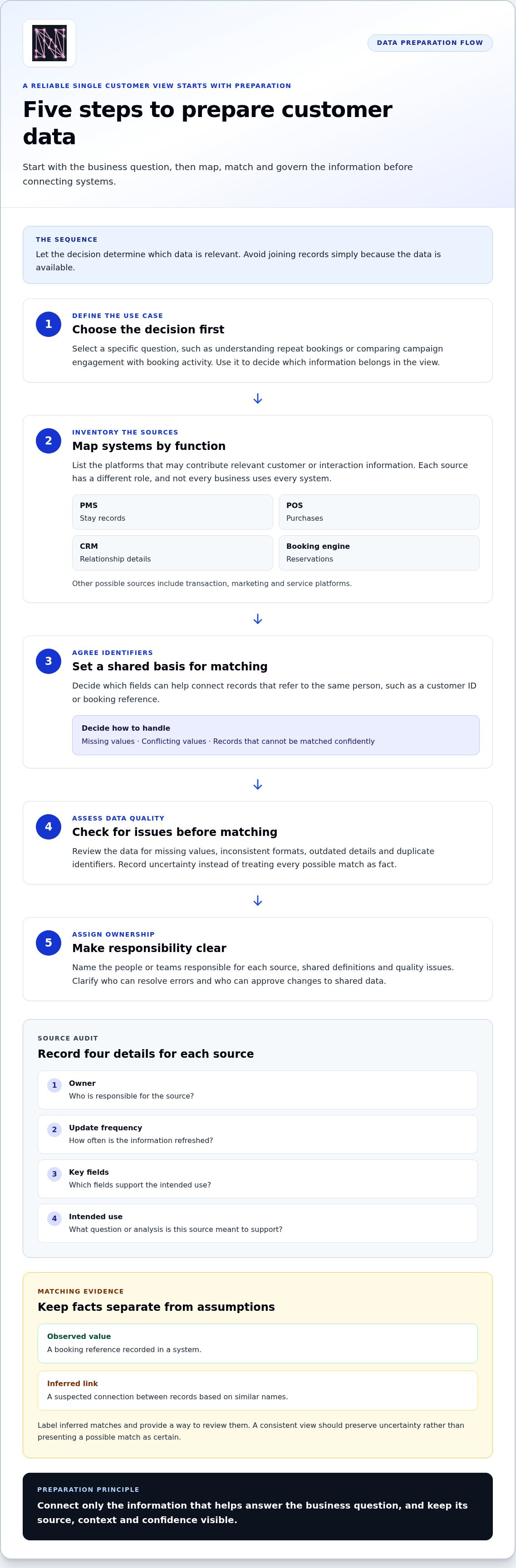
Once the business question is clear, map the information that could answer it. A disciplined preparation process helps teams avoid joining records simply because they can. It also reveals where systems use different identifiers, definitions or update schedules, all of which can undermine a view before analysis begins.
- Define the use cases. Choose a specific decision, such as understanding repeat bookings or comparing campaign engagement with booking activity. Let that question guide which data is relevant.
- Inventory the sources. Map systems by function, including CRM, booking, transaction, marketing and service platforms. In hospitality, a property management system (PMS) may hold stay records, a point-of-sale system (POS) may record purchases, a CRM may store relationship details, and a booking engine may capture reservations. Not every business uses all of these, and each source has a different role.
- Agree identifiers. Decide which fields can help connect records, such as a customer ID or booking reference, and how to handle missing or conflicting values. Consistent identifiers give systems a shared basis for matching records that refer to the same person.
- Assess data quality. Check for missing values, inconsistent formats, outdated details and duplicate identifiers. Record uncertainty rather than treating every possible match as fact.
- Assign ownership. Name the people or teams responsible for each source, definitions and quality issues. Set out who can resolve errors and who can approve changes to shared data.
Audit sources, identifiers and data quality
Make the inventory practical. For each source, record its owner, update frequency, key fields and intended use. A booking system refreshed frequently may suit recent booking analysis, while a less frequently updated CRM record may provide relationship context. This helps teams understand how current each field is before comparing it with another source.
Keep observed facts separate from assumptions made during matching. A booking reference recorded in a system is an observed value; a suspected link between two records based on similar names is an inference. Label inferred matches and provide a way to review uncertain cases. This makes the resulting view more transparent and helps prevent mistaken identity from becoming accepted data.
Set definitions and access rules before joining records
Agree what the organisation means by customer, booking, repeat visit and revenue-related measures. For example, teams should align on which booking statuses count in an analysis and what qualifies as a repeat visit. Otherwise, reports can appear to disagree even when they use the same source data.
Use the organisation’s data governance framework to set role-based access and responsibilities for handling data. Define who can view, amend or use each category of information, and document the purpose of each connection. Clear ownership and shared definitions turn a source map into a workable foundation. If you’re also connecting commercial data for analysis, explore the analytics platform features that bring revenue and marketing metrics into view.
Choose the Right Single Customer View Architecture for Your Needs
There isn’t one architecture that suits every organisation. To decide how to create a single customer view, match the approach to your priority use cases, existing systems and the capacity your teams have to manage data. A customer data platform (CDP), a connected data warehouse or analytics layer, and a staged hybrid can all connect information, but they serve different needs.
Use this comparison to frame the decision. The actual capabilities depend on how each approach is designed and which systems it connects.
| Consideration | Customer data platform | Connected warehouse or analytics layer | Staged hybrid |
|---|---|---|---|
| Identity resolution | Useful when consolidated customer profiles and matching are central requirements. | Can support joined analysis when identity rules and matching logic are defined for reporting. | Can begin with a limited set of matching rules, then extend them as needs become clearer. |
| Source coverage | Assess whether it connects the sources required for the intended profiles and workflows. | Works with selected sources brought together for analysis. | Adds priority sources in stages rather than connecting everything at once. |
| Activation needs | Relevant when teams need supported workflows to use unified profiles beyond analysis. | Best aligned with reporting and decision support, unless activation is separately designed. | Can start with analysis, then add activation where a clear need emerges. |
| Governance | Requires agreed identity rules, access and responsibility for profile quality. | Requires shared definitions, data lineage and ownership of analytical outputs. | Builds governance alongside each phase, with clear controls at every step. |
| Team ownership | Often involves data or technology teams alongside profile users. | Typically relies on analytics and data teams working with business stakeholders. | Needs an accountable owner for the pilot and agreement on who takes on later phases. |
When does a customer data platform fit?
A CDP may fit when teams need consolidated individual-level profiles and supported activation workflows, such as making customer information available for defined uses. Fit depends on whether the platform covers the required sources, supports the organisation’s identity rules and serves the intended users. Map those needs first. Don’t choose based on the label alone, and don’t assume profile consolidation automatically answers commercial performance questions.
When can an analytics layer or phased approach fit?
If the priority is joined reporting and decision support, a connected warehouse or analytics layer may be a more direct starting point. A phased hybrid can test one use case with priority data before expanding integrations, helping teams learn what adds value and where data gaps remain. For analysis of unified revenue and marketing metrics, explore the Nodal Platform features.
Keep the outputs distinct. An individual-level SCV connects records about a customer; unified revenue and marketing metrics show commercial performance across activity, channels or periods. They can inform one another, but they are not the same view. Choose an architecture that serves the required output, then set clear expectations for its scope, owners and next steps.
Build and Validate Your Single Customer View in Practical Phases
A dependable single customer view is built through controlled testing, not by connecting every source at once. Start with a use case that matters, check whether the joined records are trustworthy, then expand only when the view helps answer the intended question. This keeps the work focused and makes errors easier to spot before they influence wider analysis.
Pilot one customer use case before scaling
Choose a bounded question, such as identifying valuable direct bookings or exploring repeat-visit patterns. Define what a useful answer would look like and which team will use it. Then select only the systems and fields needed for that question. For a direct-booking pilot, this might mean booking records and relevant campaign interactions, rather than every customer data source in the organisation.
Document assumptions before interpreting early findings. Note which records can be matched confidently, where information is incomplete and which customer groups the pilot doesn’t cover. A pilot can show whether the approach is useful, but its findings shouldn’t be treated as representative beyond its defined scope.
Validate, monitor and improve the unified view
Use a phased workflow to move from a small test to a reliable, broader view:
- Connect priority sources. Bring together the systems and fields selected for the pilot, preserving where each value came from.
- Match records. Apply the agreed identifiers and matching rules, keeping uncertain links distinguishable from confident matches.
- Validate sample profiles. Compare joined records with their source systems. Check for duplicate matches, missing context and records that have been incorrectly combined.
- Review and expand. Resolve issues with the relevant owners, refine definitions or matching rules, then add sources that support the next use case.
Don’t judge progress by profile volume alone. Agree measures that reflect both data quality and practical usefulness. These could include whether sampled matches are accurate, whether key fields are present, how often duplicate or ambiguous links need review, and whether teams can use the view to answer the pilot question. Set a baseline and review the same measures as the view changes.
Connected interactions can also help teams examine how customer journeys relate to business outcomes. Customer journey mapping provides a way to organise touchpoints over time, while the unified view supplies context for analysing them. Keep the interpretation grounded: a sequence of interactions can inform analysis, but it does not prove that one touchpoint caused a booking or repeat visit.
Assign named business and data owners to maintain the view. Business owners should review definitions and whether outputs support decisions; data owners should oversee source quality, matching changes and access arrangements. Record updates and revisit assumptions when systems or business questions change. That ongoing discipline is part of how to create a single customer view teams can use with confidence.
Turn a Single Customer View into Clearer Commercial Decisions
A joined-up customer view is useful when it helps a team answer a business question. Use it to explore which segments return, how booking value varies, where retention efforts may be relevant, or how customer activity relates to direct bookings. Treat these as questions to investigate, not outcomes the data guarantees. Insights can guide decisions, but they cannot promise revenue growth or customer retention.
Connect customer context to measurable business questions
Start with a question that connects customer context to a measurable outcome: which channels are associated with valuable direct bookings? A hotel group could compare booking outcomes across guest segments, using relevant booking and campaign data. Before drawing conclusions, define “valuable”, agree which bookings count and check that the records can be connected reliably. The profile gives context; the commercial measures show what happened.
A customer profile creates value when it informs a defined decision. For example, a team might use repeat-visit patterns to decide which segments to investigate for retention activity, then track the relevant measures over time. A difference between segments is a prompt for analysis, not proof that a particular campaign or interaction caused the result.
Use unified analytics to move from fragmented metrics to action
Individual customer profiles and commercial performance views answer different questions. Nodal AI’s Unified Metrics brings revenue and marketing metrics together in one platform, while AI Growth Insights provides actionable suggestions from connected commercial data. The platform integrates with tools including Meta Ads, Google Marketing Platform and Google Analytics. These capabilities support performance analysis; they should not be confused with automatic identity resolution or assumed to create a complete individual-level profile.
For a hospitality business, unified metrics can help teams examine marketing activity alongside revenue measures and decide where to investigate further. Explore unified analytics features to see how connected metrics can support commercial analysis. If the next question is how marketing touchpoints contribute to a booking, use an attribution approach to frame that investigation and keep its assumptions clear.
Choose a practical next step for your organisation
Turn the work into a manageable sequence: define the decision, confirm which sources are ready, select an architecture that fits, validate matched records, and assign owners for data quality and changes. Then review whether the view is helping teams answer the question it was built for. Expand only when the next use case and its data needs are clear.
A single customer view is not an end in itself. Its value comes from connecting trustworthy context to measures teams can act on, without overstating what the analysis proves. If unified revenue and marketing analysis is the next step for your organisation, book a tailored Nodal Platform demo.
Make Your Next Customer Data Decision Count
The best next step is a focused one: choose a commercial question your teams need to answer and use it to shape the next stage of your customer data work. That keeps the effort tied to a real decision, rather than building a broader view without a clear purpose. If attribution is the question, explore how marketing touchpoints relate to outcomes while keeping the limits of the analysis in view.
Nodal AI’s analytics capabilities include Impact Analysis, which helps identify initiatives that drive long-term revenue and retention. The platform protects data with advanced security and enterprise-level encryption. The Ovolo Hotel Group testimonial describes results amid media costs rising by 60%. These details can help frame how analytics might support your organisation’s priorities. A clear understanding of how to create a single customer view can help you take the next step with purpose, while remembering that insights guide decisions rather than guarantee commercial results.
Start with the question that matters most. From there, your team can turn fragmented information into a more confident basis for action.
Frequently Asked Questions
What is the difference between a single customer view and a customer data platform?
A single customer view is the connected customer information teams want to use; a customer data platform is one type of technology that can help create and maintain it. The distinction is between the outcome and a possible means of achieving it. Depending on the organisation’s needs, a connected warehouse or analytics layer may also support a useful view, particularly when the priority is analysis rather than profile activation.
How do you match customer records from different systems?
Match records using identifiers that are meaningful across your systems, and set rules for cases where details disagree. A shared customer ID can provide a strong link; where it isn’t available, teams may compare fields such as email addresses after standardising their format. Keep uncertain matches separate for review rather than automatically combining them. Retaining each record’s source also helps teams investigate why a match was made.
Can a single customer view be updated in real time?
It can, if the source systems, data connections and matching process support updates at the required speed. Some setups refresh information in batches, while others can bring in changes more frequently. Choose a freshness target based on the decision: a campaign response may need prompt visibility, while a monthly trend review may not. Confirm how delays, failed updates and corrections appear in the view.
Do you need a customer data platform to create a single customer view?
No. A CDP can suit organisations that need consolidated customer profiles and workflows to activate them, but it isn’t the only route. If the main goal is joined reporting, a connected data warehouse or analytics layer may be appropriate. For teams deciding how to create a single customer view, the key question is what people need to do with the joined information, not which technology label sounds most complete.
How can you measure whether a single customer view is successful?
Measure whether the view is trustworthy and useful for its intended job. For example, track how often reviewers find incorrect links in a sample, whether key fields are available for analysis, and whether teams can answer a recurring business question without reconciling separate reports manually. Compare these measures with a baseline and revisit them as sources or definitions change. A larger profile count alone doesn’t show success.
Is a single customer view useful for hotels and hospitality businesses?
Yes. Hotels can use connected customer context to examine questions such as how booking channels relate to guest segments or whether returning guests show different booking patterns. The analysis depends on the quality and scope of the records being connected, and it shouldn’t be treated as proof that a campaign caused a booking. For a hotel group, consistent definitions across properties can also make comparisons easier to interpret.


